

A modern application rarely serves just one type of client. The same backend may support a desktop website, a mobile application, an administrative dashboard, and thousands of connected devices. Although these clients share business data, they don’t necessarily need the same information, response formats, or authentication workflows.

A desktop application may display detailed analytics, while a mobile app needs compact responses and fewer network requests. An IoT device may only need a small set of commands and configuration values. Trying to serve all these requirements through one general-purpose API can make both frontend and backend development unnecessarily complicated. The Backend-for-Frontend (BFF) pattern offers a better approach by introducing API layers designed around the needs of individual client experiences. In this guide, we’ll build practical BFF APIs with ASP.NET Core, explore aggregation, authentication, caching, resilience, and deployment strategies, and understand when this architecture makes sense.
The Problem With One API for Every Client
Imagine a logistics company that operates a delivery management platform.
The company has three different applications.
The first is a web dashboard used by operations managers. It displays delivery routes, driver locations, shipment statuses, customer details, and performance metrics.
The second is a mobile application used by delivery drivers. It shows assigned deliveries, navigation details, customer contact information, and proof-of-delivery actions.
The third is a fleet of connected tracking devices installed inside delivery vehicles. These devices periodically report location, temperature, battery level, and operational status.
All three clients belong to the same business system.
They share information about shipments, drivers, and vehicles.
But their requirements are very different.
The web dashboard may need detailed information from five backend services to build a single page.
The mobile application may need only a small subset of that information, optimized for limited bandwidth.
The tracking devices may need tiny messages and predictable response formats.
If all three clients use the same general-purpose API, that API gradually accumulates client-specific parameters, conditional responses, and specialized endpoints.
Over time, the API becomes difficult to maintain.
Consider an endpoint such as:
GET /api/deliveries/4821?client=mobile&compact=trueAnother client might request:
GET /api/deliveries/4821?client=web&includeAnalytics=trueEventually, the API must understand how every frontend works.
This creates coupling between backend services and presentation requirements.
A Backend-for-Frontend architecture helps separate those concerns.
What Is the Backend-for-Frontend Pattern?
The Backend-for-Frontend pattern introduces a dedicated backend layer for a particular frontend experience or group of clients with similar requirements.
Instead of every client directly calling the same collection of backend services, each client communicates with an API designed for its needs.
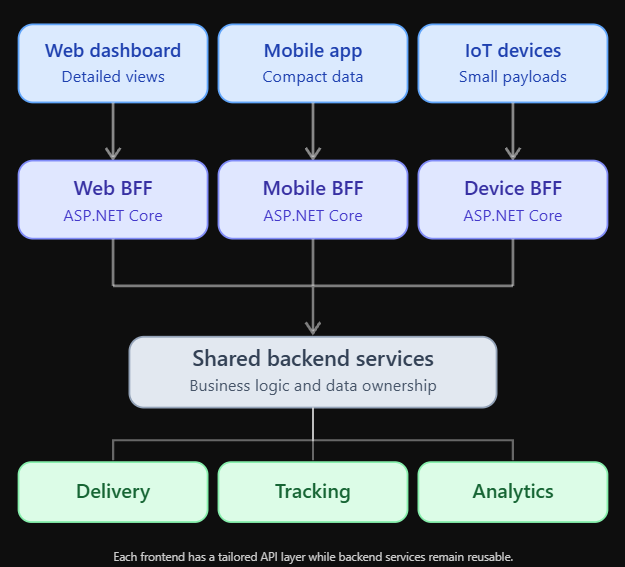
Each frontend has a tailored API layer while backend services remain reusable.
The web BFF can return detailed dashboard models.
The mobile BFF can return compact delivery summaries.
The device BFF can expose narrowly scoped telemetry and configuration endpoints.
All three can reuse the same underlying business services.
The BFF doesn’t need to duplicate the business logic.
Its primary responsibility is adapting backend capabilities to the requirements of a particular client.
BFF Versus API Gateway
A Backend-for-Frontend is sometimes confused with an API gateway.
Both sit between clients and backend services, but their responsibilities differ.
An API gateway typically handles cross-cutting infrastructure concerns such as routing, authentication enforcement, rate limiting, and request forwarding.
A BFF understands the needs of a particular frontend.
It may aggregate several backend responses, transform data, implement frontend-oriented workflows, and expose endpoints shaped around screens or client operations.
Responsibility                    API Gateway                    BFF
Request routing                   Primary responsibility         Often used
Rate limiting                     Common                         May be client-specific
Data aggregation                  Sometimes                      Common
Client-specific responses         Limited                        Primary purpose
Business logic ownership          Generally no                   Generally no
Frontend workflow adaptation      Limited                        Common
These patterns can work together.
An API gateway may route requests to different BFF services.
Each BFF then coordinates the backend calls needed by its frontend.
However, introducing both layers is not mandatory.
For smaller systems, an ASP.NET Core BFF can handle client-specific routing and aggregation without requiring a separate gateway.
When Does a BFF Make Sense?
A BFF is useful when different clients have meaningfully different needs.
Suppose a desktop dashboard requires information from six backend endpoints.
The mobile application needs information from only two.
The device client needs an entirely different authentication and payload model.
A shared API may become awkward because each client requires a different shape of the same underlying data.
A BFF gives each frontend team control over its API contract without forcing changes into shared domain services.
It can also reduce network round trips.
Instead of a mobile application calling several services independently, it can make one request to its BFF.
The BFF performs the necessary backend calls and returns a response designed for that screen.
But a BFF is not automatically the right choice.
If every client uses almost identical endpoints and response formats, a shared API may be simpler.
The goal is to solve real client-specific complexity, not introduce additional services merely because the architecture is fashionable.
Designing Our Example Application
We’ll build a simplified logistics platform.
Our backend contains three services:
Delivery Service, which stores delivery assignments and shipment details.
Tracking Service, which provides vehicle locations and operational status.
Analytics Service, which calculates delivery performance metrics.
Our frontend clients are a web dashboard, a mobile application, and a fleet tracking device.
The web dashboard needs a complete delivery overview.
The mobile application needs a concise driver-oriented view.
The tracking device needs configuration and telemetry submission endpoints.
We’ll implement the BFF layers using ASP.NET Core Minimal APIs.
The examples focus on API composition and architectural boundaries. They use simplified service contracts, with production concerns introduced as we progress.
Step 1: Define the Shared Backend Contracts
Let’s begin with the data returned by our backend services.
public sealed record Delivery(
    Guid Id,
    string CustomerName,
    string Address,
    string Status,
    Guid DriverId,
    Guid VehicleId);

public sealed record VehicleLocation(
    Guid VehicleId,
    double Latitude,
    double Longitude,
    DateTimeOffset UpdatedAt);

public sealed record DeliveryMetrics(
    Guid DeliveryId,
    int EstimatedMinutesRemaining,
    bool IsDelayed);
These models represent information owned by different services.
The Delivery Service owns shipment and assignment data.
The Tracking Service owns vehicle location information.
The Analytics Service calculates performance indicators.
The BFF shouldn’t take ownership of those responsibilities.
Instead, it consumes their APIs and produces frontend-oriented responses.
This separation is important because client requirements change more frequently than core business rules.
Step 2: Create the Web BFF Response
The web dashboard needs a detailed delivery overview.
It should display customer information, delivery status, vehicle location, and performance metrics together.
We can define a dedicated response model.
public sealed record WebDeliveryView(
    Guid DeliveryId,
    string CustomerName,
    string Address,
    string Status,
    VehicleLocation? Location,
    DeliveryMetrics? Metrics);
Notice that the response isn’t simply a copy of the Delivery Service model.
It combines information from several backend services.
This is one of the main responsibilities of a BFF.
The frontend receives the information it needs without having to understand how many backend services were involved.
Step 3: Create Typed HTTP Clients
ASP.NET Core provides IHttpClientFactory for managing HTTP clients.
We’ll use it to register typed clients for our backend services.
var builder = WebApplication.CreateBuilder(args);

builder.Services.AddHttpClient<DeliveryClient>(
    client =>
    {
        client.BaseAddress = new Uri(
            builder.Configuration[
                "Services:Delivery"]!);
    });

builder.Services.AddHttpClient<TrackingClient>(
    client =>
    {
        client.BaseAddress = new Uri(
            builder.Configuration[
                "Services:Tracking"]!);
    });

builder.Services.AddHttpClient<AnalyticsClient>(
    client =>
    {
        client.BaseAddress = new Uri(
            builder.Configuration[
                "Services:Analytics"]!);
    });
The service addresses come from configuration.
For example:
{
  "Services": {
    "Delivery": "https://delivery.internal/",
    "Tracking": "https://tracking.internal/",
    "Analytics": "https://analytics.internal/"
  }
}
In a production environment, these addresses might resolve through service discovery or internal networking.
Credentials and secrets should be managed separately from ordinary configuration files.
Step 4: Implement a Backend Client
Let’s implement the Delivery Service client.
using System.Net.Http.Json;

public sealed class DeliveryClient
{
    private readonly HttpClient _http;

    public DeliveryClient(HttpClient http)
    {
        _http = http;
    }

    public async Task<Delivery?> GetAsync(
        Guid id,
        CancellationToken cancellationToken)
    {
        return await _http.GetFromJsonAsync<Delivery>(
            $"api/deliveries/{id}",
            cancellationToken);
    }
}
The Tracking and Analytics clients can follow the same pattern.
public sealed class TrackingClient
{
    private readonly HttpClient _http;

    public TrackingClient(HttpClient http)
    {
        _http = http;
    }

    public Task<VehicleLocation?> GetAsync(
        Guid vehicleId,
        CancellationToken cancellationToken)
    {
        return _http.GetFromJsonAsync<VehicleLocation>(
            $"api/vehicles/{vehicleId}/location",
            cancellationToken);
    }
}
public sealed class AnalyticsClient
{
private readonly HttpClient _http;
public AnalyticsClient(HttpClient http)
{
_http = http;
}
public Task<DeliveryMetrics?> GetAsync(
Guid deliveryId,
CancellationToken cancellationToken)
{
return _http.GetFromJsonAsync<DeliveryMetrics>(
$"api/deliveries/{deliveryId}/metrics",
cancellationToken);
}
}These examples are intentionally minimal.
GetFromJsonAsync throws for unsuccessful HTTP status codes and can throw for network failures or invalid JSON.
Production clients should distinguish expected responses, such as 404 Not Found, from service failures and apply appropriate resilience policies.
Step 5: Build the Web BFF Endpoint
Now we’ll create an endpoint that combines the backend responses.
var app = builder.Build();

app.MapGet("/api/web/deliveries/{id:guid}",
    async (
        Guid id,
        DeliveryClient deliveries,
        TrackingClient tracking,
        AnalyticsClient analytics,
        CancellationToken cancellationToken) =>
    {
        var delivery = await deliveries.GetAsync(
            id,
            cancellationToken);

        if (delivery is null)
        {
            return Results.NotFound();
        }

        var locationTask = tracking.GetAsync(
            delivery.VehicleId,
            cancellationToken);

        var metricsTask = analytics.GetAsync(
            delivery.Id,
            cancellationToken);

        await Task.WhenAll(
            locationTask,
            metricsTask);

        var response = new WebDeliveryView(
            delivery.Id,
            delivery.CustomerName,
            delivery.Address,
            delivery.Status,
            await locationTask,
            await metricsTask);

        return Results.Ok(response);
    });

app.Run();
The BFF first retrieves the delivery.
Once it knows the vehicle ID, it requests location and analytics data concurrently.
This is more efficient than calling the two independent services sequentially.
The web client receives a single response.
{
  "deliveryId": "e8d2d2c3-6b2c-48ae-93cc-7254e75f40a1",
  "customerName": "Maria Lopez",
  "address": "120 Market Street",
  "status": "In Transit",
  "location": {
    "vehicleId": "d71e34f9-27c7-4b25-b2a4-fde741a3a9a5",
    "latitude": 37.7749,
    "longitude": -122.4194,
    "updatedAt": "2026-10-20T10:30:00Z"
  },
  "metrics": {
    "deliveryId": "e8d2d2c3-6b2c-48ae-93cc-7254e75f40a1",
    "estimatedMinutesRemaining": 18,
    "isDelayed": false
  }
}
The frontend doesn’t need to coordinate three separate service requests.
The BFF performs that work.
This simplifies frontend development and reduces client-to-server round trips.
However, the total backend work hasn’t disappeared. The BFF still makes those service calls, and their latency and failure behavior must be managed carefully.
Step 6: Design a Mobile-Specific API
The mobile application has different requirements.
A driver checking the next delivery doesn’t need analytics metrics or a complete vehicle tracking history.
The mobile interface needs a compact summary.
Let’s define a separate response model.
public sealed record MobileDeliveryView(
    Guid DeliveryId,
    string Address,
    string Status,
    int EstimatedMinutesRemaining);
The mobile BFF can expose:
GET /api/mobile/deliveries/nextA sample response might be:
{
  "deliveryId": "e8d2d2c3-6b2c-48ae-93cc-7254e75f40a1",
  "address": "120 Market Street",
  "status": "In Transit",
  "estimatedMinutesRemaining": 18
}
This response is smaller and easier for the mobile application to consume.
The mobile client doesn’t need to download fields that aren’t displayed.
The API can also expose mobile-specific workflows.
For example:
POST /api/mobile/deliveries/{id}/confirmThe BFF validates the client-facing request, forwards the operation to the appropriate backend service, and returns a mobile-friendly result.
The business rule determining whether a delivery can be confirmed should remain in the domain service.
The BFF adapts the workflow, but it doesn’t become the authoritative owner of delivery state.
Step 7: Designing APIs for Connected Devices
Connected devices introduce another set of requirements.
A tracking device may have limited memory, intermittent connectivity, and strict power constraints.
It doesn’t need the same JSON responses used by a browser.
A device might submit telemetry:
POST /api/device/telemetry
Content-Type: application/json
{
"deviceId": "tracker-204",
"temperature": 4.2,
"battery": 78,
"latitude": 37.7749,
"longitude": -122.4194
}The Device BFF can validate the payload and forward it to the telemetry ingestion service.
It may also return configuration settings.
GET /api/device/configuration{
"reportIntervalSeconds": 60,
"temperatureAlertThreshold": 8.0,
"firmwareUpdateAvailable": false
}The device receives only the information required for its operation.
This is particularly valuable when devices communicate over expensive or unreliable networks.
But device APIs also need stronger attention to identity, replay protection, payload validation, and rate limiting.
A device BFF should not simply trust a deviceId supplied in the request body.
The device identity should be established through a secure authentication mechanism.
Client-Specific Authentication Boundaries
Authentication is one of the most important areas where BFF designs differ.
A browser-based BFF commonly uses a server-managed authentication session.
The browser receives a secure, HttpOnly cookie.
The BFF manages the authentication flow and, where necessary, stores access tokens on the server rather than exposing them to browser JavaScript.
This reduces the exposure of tokens to client-side scripts.
A mobile application may instead use an OAuth 2.0 or OpenID Connect flow designed for native applications, typically Authorization Code with PKCE.
Connected devices may use device credentials, certificates, or another mechanism appropriate to their capabilities and threat model.
These differences are a strong reason not to force every client through identical authentication code.
The BFF can establish the correct trust boundary for its frontend.
Building a Secure Browser BFF
Let’s consider a browser-based dashboard.
The browser signs in through the web BFF.
After authentication, the BFF maintains a server-side session.
The browser makes requests using a secure cookie.
The BFF then calls backend APIs using the appropriate server-side credentials or delegated user tokens.
A simplified flow looks like this:
Browser
   |
   | Secure session cookie
   v
Web BFF
   |
   | Server-managed access token
   v
Backend API
The browser doesn’t need direct access to backend service tokens.
This can significantly improve token handling compared with storing access tokens in browser-accessible storage.
However, cookie-based authentication introduces its own responsibilities.
State-changing endpoints need protection against cross-site request forgery.
Cookies should use appropriate Secure, HttpOnly, and SameSite settings.
The application should also handle session expiration, logout, token renewal, and authorization failures correctly.
A BFF is not inherently secure merely because it exists.
Its security benefits depend on implementation.
Avoiding a Dangerous Authentication Shortcut
A common mistake is to forward the incoming browser’s authentication cookie directly to every backend service.
That couples internal services to the browser’s session mechanism.
It also expands the trust boundary unnecessarily.
A better design is for the BFF to authenticate the browser session and then call backend services using an appropriate service or delegated identity.
The backend service must still enforce authorization.
For example, a delivery service should verify that the authenticated principal or calling service is authorized to access the requested delivery.
The BFF should not be treated as a universal authorization bypass.
This becomes especially important in multi-tenant applications.
Reducing Frontend Network Requests
One of the most practical benefits of a BFF is reducing client-side request coordination.
Imagine a dashboard that needs five backend resources.
Without a BFF, the browser may issue five requests.
Each request has network overhead, authentication considerations, and error-handling requirements.
With a BFF, the browser makes one request.
The BFF performs the necessary internal calls and returns an aggregated response.
This doesn’t necessarily reduce the total number of HTTP requests across the system.
It changes where those requests happen.
Internal service-to-service calls may be faster than multiple requests across a mobile or public network.
The benefit is particularly noticeable when network latency is high.
However, aggregation can also create a bottleneck if the BFF performs too much work or calls services inefficiently.
The architecture must be measured rather than assumed to be faster.
Parallel Requests and Their Limits
Our earlier example used Task.WhenAll to request location and analytics data concurrently.
That works well when the operations are independent.
But parallelism isn’t free.
If one frontend request triggers 20 backend requests, and 1,000 users access the same page simultaneously, the system may generate 20,000 downstream requests.
This is called request amplification.
A BFF can unintentionally create enormous load on backend services.
Avoid excessive fan-out.
Use batch endpoints where appropriate.
Cache data that doesn’t change frequently.
Limit concurrency when calling expensive services.
Consider whether a precomputed read model would be more efficient than repeatedly assembling the same information.
The goal is to simplify frontend access without overwhelming the backend.
Handling Partial Failures
Suppose the Delivery Service is available.
The Tracking Service is also available.
But the Analytics Service is temporarily unavailable.
Should the entire dashboard fail?
Not necessarily.
The dashboard may still be useful without performance metrics.
This is where BFF-specific resilience becomes valuable.
A web BFF can return the delivery information and location while indicating that analytics are temporarily unavailable.
For example:
{
  "deliveryId": "e8d2d2c3-6b2c-48ae-93cc-7254e75f40a1",
  "status": "In Transit",
  "location": {
    "latitude": 37.7749,
    "longitude": -122.4194
  },
  "metrics": null,
  "warnings": [
    "Analytics data is temporarily unavailable."
  ]
}
The frontend can display the essential information and show a small warning for the missing section.
This is called graceful degradation.
But partial failure handling should be deliberate.
If the missing data is essential for a financial transaction, authorization decision, or safety-critical workflow, returning a partial success may be inappropriate.
Each BFF endpoint should define which dependencies are mandatory and which are optional.
Timeouts and Cancellation
Every downstream HTTP call should have a reasonable timeout.
Without timeouts, a slow backend service can cause the BFF to hold requests open unnecessarily.
For example:
builder.Services.AddHttpClient<TrackingClient>(
    client =>
    {
        client.BaseAddress = new Uri(
            builder.Configuration[
                "Services:Tracking"]!);

        client.Timeout =
            TimeSpan.FromSeconds(3);
    });
This sets a client-level timeout.
A production application may use more granular timeouts and resilience pipelines.
Cancellation should also flow through the request.
If the browser disconnects, the BFF may no longer need to continue expensive downstream requests.
Passing the request’s cancellation token helps avoid unnecessary work.
However, cancellation is cooperative.
A downstream service may already have committed a state-changing operation.
For write requests, cancellation must not be confused with guaranteed rollback.
Retries Can Make Problems Worse
Retries are useful when a backend call fails because of a temporary network issue.
But retries can also amplify overload.
Imagine the Analytics Service is struggling under heavy traffic.
If every BFF instance immediately retries failed requests several times, the service receives even more traffic.
This can make the outage worse.
Use bounded retries with backoff and jitter.
Retry only operations that are safe to repeat.
For state-changing requests, use idempotency keys or other safeguards where appropriate.
Circuit breakers, concurrency limits, and load shedding can help prevent cascading failures.
The resilience policy should reflect the operation’s semantics.
A retry policy that works for retrieving a dashboard summary may be dangerous for submitting a payment or confirming a shipment.
Caching at the BFF Layer
A BFF is a useful place to cache frontend-oriented responses.
Suppose the web dashboard displays regional delivery statistics.
Those statistics may change every minute rather than every second.
Recalculating them for every browser request may be unnecessary.
The BFF can cache the aggregated response for a short period.
builder.Services.AddOutputCache();

var app = builder.Build();

app.UseOutputCache();

app.MapGet("/api/web/regions/{regionId}/summary",
    async (
        string regionId,
        AnalyticsClient analytics,
        CancellationToken cancellationToken) =>
    {
        // Retrieve and return the regional summary.
        return Results.Ok();
    })
    .CacheOutput(policy =>
        policy.Expire(
            TimeSpan.FromSeconds(30)));
This illustrates ASP.NET Core output caching configuration.
The example doesn’t include a real analytics call, and production caching must consider authorization and data sensitivity.
A response containing one user’s private information must not be accidentally shared with another user.
For authenticated or tenant-specific responses, configure cache policies and keys carefully, or avoid shared output caching.
Caching is useful only when correctness and isolation are preserved.
Avoiding Stale Data Problems
Caching introduces a tradeoff.
It improves response times and reduces backend load.
But clients may receive data that is slightly out of date.
For an analytics dashboard, a 30-second delay may be acceptable.
For a delivery confirmation or payment status, stale data could create confusion.
The BFF should define freshness requirements for each response.
Some endpoints can use short time-based caching.
Others may use event-driven invalidation.
Critical operations may require direct reads from the authoritative backend service.
The frontend should understand whether the information is live, recently cached, or eventually consistent.
This is particularly important when different BFFs expose different representations of the same business data.
Should Every Frontend Have Its Own BFF?
Not necessarily.
The pattern is about distinct frontend requirements, not creating a service for every application.
Suppose a company has a desktop web dashboard and a tablet dashboard.
Both display almost identical data and use the same authentication model.
A shared BFF may be appropriate.
Now suppose the company introduces a mobile driver application with offline support, compact payloads, and specialized workflows.
That client may benefit from a separate BFF.
The boundary should follow meaningful differences in client behavior and ownership.
Creating too many BFF services increases deployment, monitoring, and maintenance overhead.
The objective is to reduce complexity, not distribute it into unnecessary projects.
Organizing BFF Projects in ASP.NET Core
A practical solution structure might look like this:
LogisticsPlatform/
|
|-- WebBff/
|   |-- Endpoints/
|   |-- Clients/
|   |-- Contracts/
|   |-- Authentication/
|
|-- MobileBff/
|   |-- Endpoints/
|   |-- Clients/
|   |-- Contracts/
|
|-- DeviceBff/
|   |-- Endpoints/
|   |-- Clients/
|   |-- Contracts/
|
|-- Shared/
|   |-- ServiceContracts/
|   |-- Observability/
|
|-- BackendServices/
    |-- DeliveryService/
    |-- TrackingService/
    |-- AnalyticsService/
Each BFF owns its client-facing API contracts.
Shared libraries can contain stable infrastructure components and service-client abstractions.
But avoid putting every response model into a giant shared package.
That can recreate the coupling the BFF architecture was intended to remove.
The web BFF should be free to evolve its dashboard response without forcing the mobile BFF to change.
Contract-First Development for BFF APIs
Client-specific APIs benefit from clear contracts.
The frontend team needs to know which endpoints exist, what they return, and how errors are represented.
OpenAPI can describe these contracts.
For example, the mobile BFF might define:
GET /api/mobile/deliveries/nextWith a response model:
{
  "deliveryId": "e8d2d2c3-6b2c-48ae-93cc-7254e75f40a1",
  "address": "120 Market Street",
  "status": "In Transit",
  "estimatedMinutesRemaining": 18
}
The frontend team can generate a typed client from the API contract.
This reduces mismatches between frontend expectations and backend implementation.
In our previous article on Contract-First API Development in ASP.NET Core, we explored how OpenAPI and schema governance improve API evolution.
Those principles apply directly to BFF APIs.
The important difference is that each BFF can maintain a contract tailored to its frontend rather than exposing every internal service model.
Versioning Client-Specific APIs
BFF APIs evolve as frontend applications change.
Web applications can often deploy frontend and BFF updates together.
Mobile applications are different.
Users may continue running older app versions for weeks or months.
A mobile BFF must account for this.
Removing a field or changing an endpoint can break older clients.
Versioning strategies may include explicit API versions, additive schema evolution, and temporary support for older contracts.
For example:
GET /api/mobile/v1/deliveries/nextAnd later:
GET /api/mobile/v2/deliveries/nextVersioning should be based on compatibility requirements rather than automatically creating a new version for every release.
Device clients can have even longer upgrade cycles.
A tracking device installed in a vehicle may remain on older firmware for years.
The Device BFF may therefore need a carefully managed compatibility policy.
Supporting Offline-First Mobile Applications
Mobile applications frequently operate under unreliable network conditions.
A delivery driver may lose connectivity inside a warehouse or in a remote area.
The mobile BFF can support offline-first workflows by exposing synchronization-oriented endpoints.
For example:
GET /api/mobile/sync?cursor=abc123The response might include changes since the last successful synchronization.
{
  "nextCursor": "abc124",
  "changes": [
    {
      "deliveryId": "e8d2d2c3-6b2c-48ae-93cc-7254e75f40a1",
      "status": "Assigned"
    }
  ],
  "hasMore": false
}
The mobile application stores the changes locally.
When connectivity returns, it can upload pending actions.
However, the BFF should not invent its own conflicting source of truth.
Synchronization semantics, conflict resolution, and authoritative data ownership must be coordinated with the underlying domain services.
The BFF adapts those capabilities into a mobile-friendly contract.
BFF and Real-Time Updates
Not every frontend needs real-time communication in the same way.
A web dashboard may display live vehicle locations.
A mobile application may need occasional delivery status notifications.
A tracking device may primarily upload telemetry rather than receive continuous updates.
The web BFF could expose a Server-Sent Events endpoint.
GET /api/web/deliveries/events
Accept: text/event-stream
The mobile application might use push notifications combined with ordinary API requests.
The device BFF might provide a lightweight configuration polling endpoint.
These choices don’t need to be identical.
In our previous guide on Server-Sent Events in ASP.NET Core, we explored how SSE provides efficient one-way streaming over HTTP.
A BFF can use SSE where it benefits the frontend without requiring every backend service to expose streaming endpoints directly.
Using YARP in a BFF Architecture
ASP.NET Core applications can use YARP, Microsoft’s reverse proxy toolkit, to forward requests to backend services.
YARP is useful when a BFF needs both custom aggregation endpoints and straightforward proxy routes.
For example, the BFF might aggregate data for dashboard pages while forwarding certain specialized requests directly to a backend service.
YARP can handle routing and proxy behavior, while application endpoints handle client-specific composition.
The official documentation is available at Microsoft Learn: YARP reverse proxy.
However, a BFF shouldn’t become an unrestricted proxy to internal services.
Only intended routes should be exposed.
Authentication, authorization, header forwarding, and request limits must be configured carefully.
Observability Across the BFF Layer
Adding a BFF introduces another hop into the request path.
That makes observability essential.
Suppose a dashboard takes four seconds to load.
Is the BFF slow?
Is the Tracking Service responding slowly?
Is the Analytics Service timing out?
Is the BFF waiting on too many downstream calls?
Distributed tracing can connect the incoming frontend request to its downstream service calls.
A trace might look like this:
GET /api/web/dashboard
    |
    +-- Delivery Service      45 ms
    |
    +-- Tracking Service     120 ms
    |
    +-- Analytics Service   3100 ms
    |
    +-- Response mapping      8 ms
The trace immediately reveals that the Analytics Service dominates the response time.
Without tracing, developers may incorrectly blame the BFF layer.
Useful metrics include response latency, downstream call duration, error rates, cache hit rates, request amplification, and fallback frequency.
The BFF should be observable as its own service while preserving correlation with backend operations.
Testing BFF APIs
BFF testing focuses on contracts, aggregation behavior, security, and failure handling.
Unit tests can verify how backend responses are transformed into frontend models.
Integration tests can verify HTTP endpoints and authentication policies.
Contract tests can confirm that the BFF continues to satisfy frontend expectations.
For example, a test might verify that the mobile delivery response doesn’t expose unnecessary customer information.
Another test might simulate an Analytics Service outage and confirm that the web dashboard returns a partial response when that behavior is explicitly supported.
Security tests should verify that users cannot access deliveries belonging to another tenant.
Performance tests should measure the effect of concurrent frontend requests on downstream services.
A BFF that performs well with one user may create excessive backend traffic under load.
Deployment and Scaling
One advantage of separate BFF services is independent scaling.
The web dashboard may experience heavy traffic during business hours.
The mobile application may have peaks during delivery shifts.
Tracking devices may send telemetry continuously throughout the day.
Separate BFF deployments allow each workload to scale according to its own traffic pattern.
However, independent deployment also increases operational overhead.
Each service needs configuration, monitoring, security updates, and deployment automation.
For smaller teams, a modular BFF hosted in one ASP.NET Core application may be more practical.
As client requirements and traffic patterns diverge, those modules can be separated into independently deployed services.
The architecture should evolve with actual needs.
Common Mistakes to Avoid
A BFF should not become a second domain layer.
If delivery pricing, shipment eligibility, or payment rules are implemented independently in each BFF, business behavior can become inconsistent.
Those rules belong in authoritative backend services.
Another mistake is creating one BFF per screen.
That produces too many services and makes deployment unnecessarily complex.
A BFF should represent a meaningful frontend boundary, not every individual page.
Developers should also avoid excessive request aggregation.
A single frontend request that triggers dozens of backend calls may become expensive and fragile.
Caching must respect user and tenant boundaries.
Authentication must be designed for each client type.
Finally, BFF services should not expose internal backend models without considering frontend contracts.
Doing so recreates tight coupling between the frontend and internal services.
A Production-Ready BFF Architecture
Let’s bring the pieces together.
Our logistics platform has three frontend experiences.
The web dashboard uses a Web BFF for aggregated views, browser authentication, and real-time updates.
The mobile application uses a Mobile BFF for compact responses, synchronization, and mobile-specific workflows.
Tracking devices use a Device BFF for telemetry ingestion and configuration retrieval.
The BFFs communicate with shared domain services through controlled internal APIs.
Each BFF has its own authentication boundary, response contracts, resilience policies, and observability.
Shared business logic remains in the backend services.
This architecture provides flexibility without sacrificing domain consistency.
The key is maintaining a clear separation between frontend adaptation and business ownership.
Coming Next
In our next article, we’ll explore Passwordless Authentication in ASP.NET Core: Passkeys, WebAuthn, and Modern Sign-In.
Passwords remain one of the most common sources of security problems in web applications.
Users reuse passwords, choose weak credentials, and fall victim to phishing attacks.
Passkeys offer a different authentication model built around public-key cryptography.
We’ll explore how WebAuthn works, how passkeys differ from traditional passwords, and how ASP.NET Core applications can integrate modern authentication flows.
We’ll also examine registration, sign-in, recovery, device synchronization, and production security considerations.
Final Thoughts
The Backend-for-Frontend pattern solves a practical problem in modern application development.
Different clients need different APIs.
A desktop dashboard, mobile application, and connected device may share business data, but they don’t share identical requirements.
Trying to force all three through one general-purpose API can create unnecessary coupling, excessive network traffic, and complicated frontend logic.
A BFF introduces a dedicated layer that adapts backend capabilities to the needs of each client.
It can aggregate data, reduce frontend round trips, simplify authentication boundaries, and provide client-specific response models.
ASP.NET Core provides the building blocks needed to implement these layers through Minimal APIs, typed HTTP clients, caching, resilience, authentication, and reverse proxy integration.
But BFFs must be designed carefully.
They should not duplicate domain logic.
They should not become unrestricted proxies.
They should not introduce excessive backend fan-out.
And they should not be added when a shared API already meets the application’s needs.
A well-designed BFF doesn’t make backend services less reusable. It makes frontend applications easier to build while allowing backend services to remain focused on their own responsibilities.
Subscribe Now
Modern ASP.NET Core development is about building systems that are secure, efficient, scalable, and maintainable across different client experiences.
Subscribe to ASP Today for practical tutorials, real-world architecture patterns, and production-focused .NET development guides.
Join our Substack Chat to discuss Backend-for-Frontend architectures, API design, authentication, microservices, and the challenges of supporting web, mobile, and connected devices.
Subscribe now and follow the series as we continue exploring the technologies and architectural decisions behind modern ASP.NET Core applications.