

Modern applications are expected to deliver information as it happens. Users want to see report progress, order updates, live dashboards, system alerts, and background processing results without repeatedly refreshing the page. Traditional HTTP APIs work well for requesting information, but they are less efficient when the server needs to deliver a continuous stream of updates. Server-Sent Events (SSE) provide a lightweight solution by allowing an ASP.NET Core application to push events to connected clients over a standard HTTP connection.
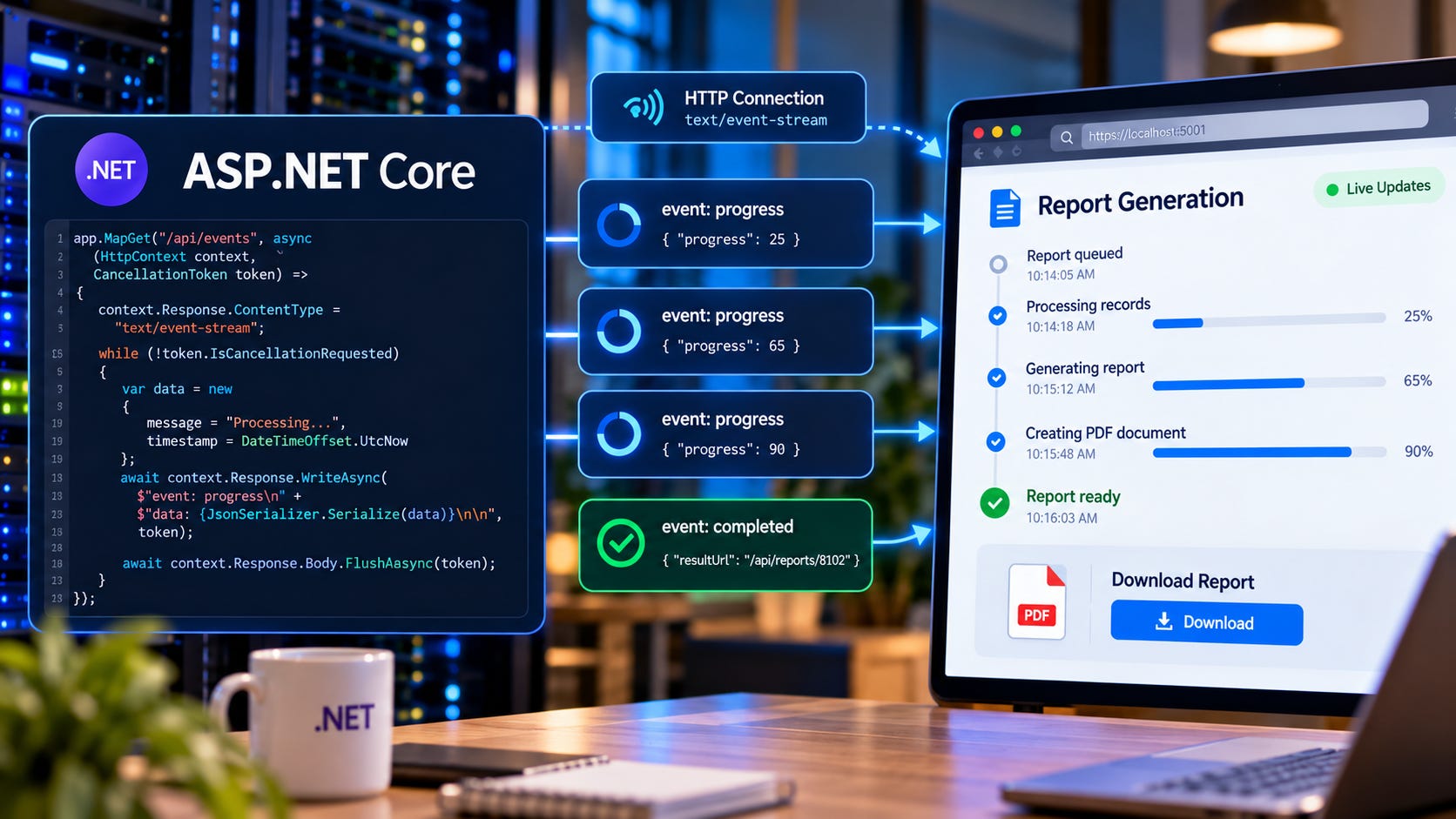
In this guide, we'll explore how SSE works, build a practical event-streaming API, implement browser clients, handle reconnections and missed events, manage connection lifetimes, and prepare SSE endpoints for production environments.
Why Traditional HTTP APIs Are Not Always Enough
Imagine an application that generates large financial reports.
A customer submits a request to generate a report covering several years of transactions. The application accepts the request, places it in a background queue, and begins processing.
The operation might take three minutes.
During those three minutes, the customer wants to know what’s happening.
Has the report started? How many records have been processed? Is the system generating the PDF? Has the report finished?
In a traditional HTTP API, the browser might repeatedly request the operation’s status.
GET /api/operations/8f42a1The server responds:
{
  "operationId": "8f42a1",
  "status": "running",
  "progress": 45
}
Five seconds later, the browser sends another request.
Then another.
And another.
This approach is called polling.
Polling is simple and reliable when implemented properly, but it has a limitation. The client must repeatedly ask whether anything has changed, even when the answer is no.
For one user, this is rarely a problem.
For thousands of users monitoring long-running operations, dashboards, or live notifications, unnecessary polling can generate significant traffic.
Server-Sent Events offer another approach.
Instead of the browser repeatedly asking for updates, the server sends new information whenever it becomes available.
Understanding Server-Sent Events
Server-Sent Events are a web standard for streaming events from a server to a client over HTTP.
The client opens a connection to an SSE endpoint.
The server keeps the HTTP response open and sends events as they occur.
The client receives those events without issuing a separate request for each update.
The communication is one-directional.
The server sends information to the client.
If the client needs to submit information, it uses an ordinary HTTP request or another communication mechanism.
That simplicity is one of SSE’s biggest advantages.
An application doesn’t need a full bidirectional communication protocol when its primary requirement is delivering updates from the server.
Consider a report-generation workflow.
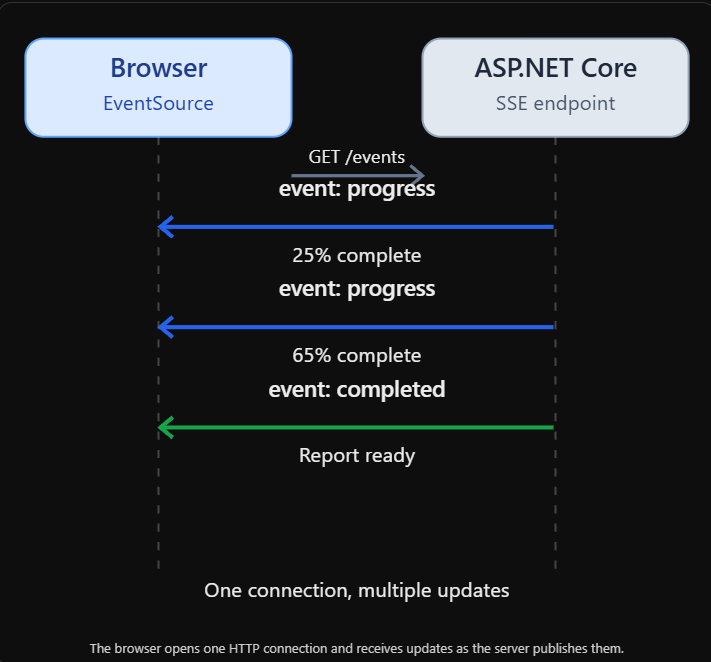
The browser opens one HTTP connection and receives updates as the server publishes them.
The browser doesn’t need to know exactly when the next update will arrive.
It simply listens.
When the server publishes an event, the browser receives it.
SSE Versus Polling Versus WebSockets
SSE is not the only way to deliver real-time information.
ASP.NET Core applications can also use polling, WebSockets, and SignalR.
Each approach serves a different purpose.
Feature              Polling               SSE                               WebSockets
Communication        Client requests       Server to client                  Bidirectional
Connection           Repeated requests     Persistent HTTP response          Persistent WebSocket
Browser API          Fetch                 EventSource                       WebSocket
Automatic reconnect  Custom logic          Built into EventSource            Custom logic
Data format          Any HTTP response     UTF-8 text events                 Text or binary
Best suited for      Occasional updates    Live notifications and streams    Interactive two-way messaging
SSE works particularly well when the browser primarily receives information.
A dashboard displaying live metrics is a good example.
The user doesn’t need to send a message every time the CPU utilization changes.
The server simply publishes new readings.
A collaborative editing application is different.
Users continuously send and receive changes. Bidirectional communication is central to the experience.
WebSockets or SignalR are generally more appropriate there.
In our earlier article on SignalR in Enterprise Applications, we explored how SignalR supports real-time communication through connection management, transport negotiation, and scalable messaging. SSE offers a simpler alternative when applications only need to stream updates from the server to connected clients.
One important distinction is that SignalR is a higher-level framework, not simply another name for WebSockets. It provides connection management, messaging abstractions, and transport negotiation.
For straightforward one-way event streams, native SSE can be simpler.
How SSE Works Over HTTP
An SSE connection begins with an ordinary HTTP request.
GET /api/events
Accept: text/event-stream
The server responds with:
HTTP/1.1 200 OK
Content-Type: text/event-stream
Cache-Control: no-cache
Unlike a normal API response, the server doesn’t immediately finish the response body.
Instead, it streams messages over time.
For example:
event: progress
data: {"operationId":"8f42a1","progress":25}

event: progress
data: {"operationId":"8f42a1","progress":65}

event: completed
data: {"operationId":"8f42a1","resultUrl":"/api/reports/8102/download"}
Each event is separated by a blank line.
The event: field identifies the event type.
The data: field contains the payload.
The browser parses these messages and delivers them to JavaScript event handlers.
This format is intentionally simple.
It doesn’t require a separate binary protocol or complex framing layer.
Understanding the SSE Message Format
An SSE event can contain several fields.
id: 105
event: report-progress
data: {"progress":75}
retry: 5000
Let’s examine them.
id: identifies an event. The browser can remember the latest event ID and use it during reconnection.
event: defines a named event type. Clients can register listeners for specific event names.
data: contains the event payload. Applications commonly encode JSON here, although SSE itself is a text format.
retry: suggests a reconnection delay in milliseconds for supporting clients.
A blank line marks the end of the event.
The server can also send comments:
: heartbeatLines beginning with a colon are ignored by the browser’s event-dispatch logic.
They are useful for keeping an otherwise idle stream active.
SSE supports multiple data: lines within a single event. The browser combines them with newline characters.
Understanding these details matters because a malformed event stream may remain connected while failing to deliver the expected messages.
Building Our First SSE Endpoint in ASP.NET Core
Let’s create a small working example using ASP.NET Core Minimal APIs.
Our first endpoint will publish a timestamp every second.
This is intentionally simple. It allows us to focus on the mechanics of streaming before introducing background workers and durable event storage.
Create a new project:
dotnet new web -n SseDemo
cd SseDemo
Open Program.cs.
We’ll implement a streaming endpoint using HttpResponse.WriteAsync.
using System.Text.Json;

var builder = WebApplication.CreateBuilder(args);

var app = builder.Build();

app.MapGet("/api/events", async (
    HttpContext context,
    CancellationToken cancellationToken) =>
{
    context.Response.ContentType =
        "text/event-stream";

    context.Response.Headers.CacheControl =
        "no-cache";

    context.Response.Headers["X-Accel-Buffering"] =
        "no";

    await context.Response.StartAsync(
        cancellationToken);

    var eventId = 0;

    try
    {
        while (!cancellationToken.IsCancellationRequested)
        {
            eventId++;

            var payload = JsonSerializer.Serialize(new
            {
                message = "Server is running",
                timestamp = DateTimeOffset.UtcNow
            });

            await context.Response.WriteAsync(
                $"id: {eventId}\n" +
                "event: heartbeat\n" +
                $"data: {payload}\n\n",
                cancellationToken);

            await context.Response.Body.FlushAsync(
                cancellationToken);

            await Task.Delay(
                TimeSpan.FromSeconds(1),
                cancellationToken);
        }
    }
    catch (OperationCanceledException)
        when (cancellationToken.IsCancellationRequested)
    {
        // Client disconnected or request was cancelled.
    }
});

app.Run();
Run the application:
dotnet runOpen the endpoint in a browser or use a terminal:
curl -N http://localhost:5000/api/eventsReplace the URL with the actual address printed by the application.
The -N option tells curl not to buffer the output.
You should see events arriving approximately once per second.
The response stays open until the client disconnects or the server ends the stream.
Why Flushing Matters
When an ASP.NET Core endpoint writes to the response body, the data may pass through buffering layers.
For an ordinary HTTP response, buffering is often useful.
For SSE, the goal is to deliver each event promptly.
Calling:
await context.Response.Body.FlushAsync(
    cancellationToken);
asks the response stream to flush buffered data.
Without timely flushing, several events may be delayed and delivered together.
However, flushing at the application level doesn’t guarantee immediate delivery through every proxy, CDN, or network intermediary.
Production deployments must also account for intermediary buffering and connection timeouts.
The X-Accel-Buffering: no header is useful for compatible Nginx configurations, but it is not a universal instruction understood by every proxy.
Using the Browser’s EventSource API
Browsers provide a built-in API for consuming Server-Sent Events.
It’s called EventSource.
Let’s connect our browser to the endpoint.
const source = new EventSource("/api/events");

source.addEventListener("heartbeat", event => {
    const data = JSON.parse(event.data);

    console.log("Message:", data.message);
    console.log("Timestamp:", data.timestamp);
});

source.onerror = () => {
    console.log("SSE connection interrupted");
};
That’s enough to receive the stream.
The browser opens the connection and listens for events.
When a heartbeat event arrives, the corresponding listener runs.
If the connection is interrupted unexpectedly, EventSource generally attempts to reconnect automatically.
This is one of the reasons SSE is attractive for browser-based dashboards and status updates.
The client doesn’t need to implement a complete reconnection loop from scratch.
EventSource Has Important Limitations
The native EventSource API is intentionally narrow.
It opens an HTTP GET request.
It doesn’t allow applications to specify arbitrary request headers through its constructor.
That matters for authentication.
If an API requires an Authorization: Bearer ... header, native EventSource cannot directly supply that header.
For same-origin applications, cookie-based authentication is often convenient.
For cross-origin requests, the constructor supports a withCredentials option:
const source = new EventSource(
    "https://api.example.com/events",
    {
        withCredentials: true
    });
The server must configure CORS and credentials correctly for this to work.
Another option is using a streaming fetch() implementation, which gives the application more control over request headers but requires custom stream parsing and reconnection logic.
Avoid placing long-lived access tokens in query strings. URLs may appear in logs, monitoring systems, browser history, and other infrastructure.
Authentication should be designed as part of the SSE contract, not added as an afterthought.
Building a Real-World Report Progress Stream
Let’s connect SSE to the asynchronous report-processing workflow from our previous article, Building Asynchronous APIs in ASP.NET Core: Long-Running Operations and the 202 Accepted Pattern.
That article introduced a useful architecture:
The client submits a report request.
The API returns HTTP 202 Accepted.
A background worker processes the report.
The client checks the operation’s status.
SSE can improve the final step.
Instead of polling repeatedly, the client subscribes to updates for the accepted operation.
For example:
GET /api/operations/8f42a1/events
Accept: text/event-stream
The server might publish:
event: status
data: {"status":"queued"}

event: status
data: {"status":"running"}

event: progress
data: {"progress":35}

event: progress
data: {"progress":80}

event: completed
data: {"resultUrl":"/api/reports/8102/download"}
The browser receives updates as the worker makes progress.
This creates a more responsive user experience without requiring the browser to repeatedly request the same status resource.
Importantly, the operation-status endpoint should still exist.
SSE is a delivery mechanism, not a replacement for durable operation state.
Separating Event Production From Event Delivery
A common mistake is to perform the background operation directly inside the SSE endpoint.
For example, an endpoint might start generating a report and stream progress while the work runs.
That can be appropriate for short-lived, disposable streaming operations.
It is not suitable when the report must continue after the browser disconnects.
For durable background work, the worker and the SSE connection should be independent.
The worker processes the report.
The operation store records its state.
An event publisher distributes progress notifications.
The SSE endpoint forwards relevant notifications to connected clients.
The resulting architecture looks like this:
Report request
      |
      v
ASP.NET Core API
      |
      v
Durable operation store
      |
      v
Background worker
      |
      +----> Update operation state
      |
      +----> Publish progress event
                       |
                       v
                 Event delivery
                       |
                       v
                 SSE endpoint
                       |
                       v
                    Browser
This separation is important.
If the browser disconnects, report generation continues.
If the SSE endpoint restarts, the report’s durable state remains intact.
If the client reconnects, it can retrieve the current operation state and, when supported, replay missed events.
Publishing Events With Channels
ASP.NET Core applications can use System.Threading.Channels to coordinate asynchronous event production and consumption within a process.
A channel acts as a queue between a writer and a reader.
For a simple demonstration, we’ll create a dedicated channel for each subscriber.
using System.Collections.Concurrent;
using System.Threading.Channels;

public sealed record ProgressEvent(
    Guid OperationId,
    string Status,
    int? Progress,
    string? ResultUrl);

public sealed class ProgressEventHub
{
    private readonly ConcurrentDictionary<
        Guid,
        Channel<ProgressEvent>> _subscribers = new();

    public (
        Guid SubscriptionId,
        ChannelReader<ProgressEvent> Reader)
        Subscribe()
    {
        var id = Guid.NewGuid();

        var channel =
            Channel.CreateUnbounded<ProgressEvent>();

        _subscribers[id] = channel;

        return (id, channel.Reader);
    }

    public void Unsubscribe(Guid id)
    {
        if (_subscribers.TryRemove(
            id,
            out var channel))
        {
            channel.Writer.TryComplete();
        }
    }

    public async Task PublishAsync(
        ProgressEvent progressEvent)
    {
        foreach (var channel in _subscribers.Values)
        {
            await channel.Writer.WriteAsync(
                progressEvent);
        }
    }
}
This example illustrates fan-out to multiple subscribers.
Every subscriber gets its own channel.
That’s important because a single channel with multiple readers typically distributes messages among readers rather than broadcasting each message to everyone.
However, this demonstration has limitations.
It broadcasts all events to all subscribers, uses unbounded buffers, and stores subscriptions only in memory.
Those characteristics make it unsuitable as a production implementation.
For real systems, subscribers should receive only authorized operation events, buffers should be bounded, and slow consumers need an explicit handling policy.
Connecting the Event Hub to an SSE Endpoint
Register the hub:
builder.Services.AddSingleton<ProgressEventHub>();Now expose an SSE endpoint:
using System.Text.Json;

app.MapGet("/api/progress/events", async (
    HttpContext context,
    ProgressEventHub hub,
    CancellationToken cancellationToken) =>
{
    context.Response.ContentType =
        "text/event-stream";

    context.Response.Headers.CacheControl =
        "no-cache";

    var subscription = hub.Subscribe();

    try
    {
        await foreach (
            var progressEvent in
                subscription.Reader.ReadAllAsync(
                    cancellationToken))
        {
            var json =
                JsonSerializer.Serialize(progressEvent);

            await context.Response.WriteAsync(
                $"event: progress\ndata: {json}\n\n",
                cancellationToken);

            await context.Response.Body.FlushAsync(
                cancellationToken);
        }
    }
    catch (OperationCanceledException)
        when (cancellationToken.IsCancellationRequested)
    {
        // Client disconnected.
    }
    finally
    {
        hub.Unsubscribe(
            subscription.SubscriptionId);
    }
});
A background worker can call PublishAsync whenever the report’s progress changes.
Connected clients receive the update.
The code demonstrates the mechanics of in-process fan-out, not a complete production report-streaming system.
In particular, a production endpoint should scope subscriptions to a specific authorized operation and avoid exposing events belonging to other users.
Why Unbounded Channels Are Dangerous
In our example, each subscriber has an unbounded channel.
This makes the demonstration straightforward because publishers don’t need to wait for capacity.
But imagine a browser connected through a very slow network.
The worker publishes 100 events per second.
The client can consume only 10 events per second.
The backlog grows continuously.
Eventually, the server may hold thousands of pending events for that client.
With enough slow clients, memory usage can become a serious problem.
This is where backpressure becomes important.
Our earlier ASP Today article on Designing Backpressure in ASP.NET Core explored why incoming work must be controlled when processing capacity is limited.
The same principle applies to SSE.
A server should not accumulate unlimited events for clients that cannot keep up.
Bounded Buffers and Slow Consumers
A bounded channel limits how many events can wait in memory.
For example:
var channel =
    Channel.CreateBounded<ProgressEvent>(
        new BoundedChannelOptions(100)
        {
            FullMode =
                BoundedChannelFullMode.Wait,
            SingleReader = true,
            SingleWriter = false
        });
With Wait, producers can experience backpressure when the channel reaches capacity.
That may be appropriate for some event pipelines.
However, allowing one slow SSE subscriber to block a shared publisher can delay every other subscriber.
For progress notifications, it may be acceptable to discard intermediate updates.
For example, if a report has progressed from 41 percent to 72 percent, the browser may not need every percentage in between.
A bounded buffer with a documented coalescing or drop policy can be appropriate.
For audit events, financial transactions, or other information that must not be lost, dropping messages is unacceptable.
Those events need durable storage and a separate replay mechanism.
The right buffering strategy depends on the meaning of the data.
Handling Client Disconnections
An SSE connection may end for many reasons.
The user closes the browser.
The device loses connectivity.
A reverse proxy closes an idle connection.
The server restarts.
The client navigates to another page.
ASP.NET Core exposes request cancellation through HttpContext.RequestAborted, which can be received as the endpoint’s CancellationToken.
A streaming endpoint should observe this token during writes, flushes, and waits.
When the request is cancelled, the endpoint should release its subscription and any associated resources.
This is why the earlier example uses a finally block.
Without cleanup, an application can accumulate subscriptions that no longer have active clients.
Over time, those stale subscriptions may waste memory and processing capacity.
Automatic Reconnection With EventSource
One of the most useful browser features of SSE is automatic reconnection.
Suppose a dashboard receives live updates.
The network connection drops for a few seconds.
With native EventSource, the browser generally attempts to reconnect without requiring the application to create a new connection manually.
The server can suggest a delay:
retry: 5000This tells the browser to use a five-second reconnection delay.
But reconnection alone does not guarantee that the client receives events published during the interruption.
That requires event identification and replay support.
Event IDs and Last-Event-ID
SSE supports event identifiers.
Consider:
id: 101
event: progress
data: {"progress":40}

id: 102
event: progress
data: {"progress":60}

id: 103
event: progress
data: {"progress":80}
The browser remembers the last event ID it processed.
If the connection drops after event 102, a reconnecting native EventSource can include:
Last-Event-ID: 102The server can use that value to determine which events the client missed.
This is an important distinction.
The browser helps track the last event ID, but the server must implement replay.
Simply adding id: fields does not make an event stream durable.
If events exist only in an in-memory channel, they may already be gone when the client reconnects.
Designing Durable Event Replay
For systems where missed events matter, store events durably.
A simple event table might look like this:
CREATE TABLE OperationEvents
(
    EventId BIGINT IDENTITY(1,1) PRIMARY KEY,
    OperationId UNIQUEIDENTIFIER NOT NULL,
    EventType NVARCHAR(100) NOT NULL,
    Payload NVARCHAR(MAX) NOT NULL,
    CreatedAt DATETIME2 NOT NULL
);
This example uses SQL Server syntax.
Each published event receives a stable identifier.
When a client reconnects with Last-Event-ID, the server can retrieve later events.
For example:
SELECT EventId,
       EventType,
       Payload
FROM OperationEvents
WHERE OperationId = @OperationId
  AND EventId > @LastEventId
ORDER BY EventId;
This gives the server a way to replay missed events.
However, a production implementation needs to consider concurrent event insertion, transaction commit ordering, event retention, and the transition from replaying stored events to receiving live events.
A database identity value does not automatically guarantee that transactions commit in the same order as their allocated IDs.
If strict replay ordering matters, the application must design an ordering and cursor mechanism that respects its consistency guarantees.
Avoiding Gaps Between Replay and Live Streaming
A subtle race condition appears when an SSE endpoint combines database replay with live subscriptions.
Imagine the following sequence.
The client reconnects.
The server queries stored events.
The query finishes.
A new event is published.
The server then subscribes to live events.
The event published between the query and subscription may be missed.
A reliable design must close this gap.
One approach is to establish the live subscription before replay, then reconcile incoming events against a durable cursor.
Another approach uses a single durable event source that supports ordered reads and continuous consumption.
Either way, the server must prevent gaps and duplicates from confusing clients.
For many dashboards, retrieving a fresh snapshot after reconnection is simpler than replaying every intermediate update.
The correct choice depends on whether the client needs the latest state or the complete event history.
State Snapshots Versus Event Replay
Consider a dashboard displaying current CPU utilization.
The client disconnects for 30 seconds.
During that period, the server publishes 100 readings.
When the client reconnects, does it need all 100?
Probably not.
A fresh reading may be enough.
Now consider a financial event stream where each event represents a transaction.
Missing an event could produce an incorrect balance or incomplete audit history.
In that case, replay is important.
This leads to a useful design principle.
Use state snapshots when clients primarily need the latest value. Use durable replay when clients must observe every meaningful event.
Some applications need both.
They may retrieve a snapshot, then continue consuming events from a known cursor.
Heartbeats and Idle Connections
Some SSE streams publish events continuously.
Others may remain quiet for several minutes.
A quiet connection can be mistaken for an abandoned connection by proxies or other infrastructure.
A server can send periodic comments:
: heartbeatThe browser ignores the comment as an application event.
But the bytes travel over the existing HTTP response.
A heartbeat loop might send a comment every 15 or 30 seconds, depending on infrastructure requirements.
The interval should be chosen based on measured proxy and network behavior rather than an arbitrary universal rule.
Also remember that heartbeats do not make a connection immortal.
Mobile networks, browser lifecycle changes, server restarts, and infrastructure limits can still interrupt streams.
Reconnection must remain part of the design.
SSE and HTTP/2
SSE works over ordinary HTTP, including HTTP/1.1 and HTTP/2.
HTTP/2 is particularly useful when a browser needs several concurrent streams to the same origin.
Under HTTP/1.1, browsers typically impose relatively small per-origin connection limits.
Multiple SSE connections can consume those available connections and interfere with other requests.
HTTP/2 multiplexes multiple streams over a connection and generally provides more flexibility, although concurrent stream limits still apply.
This doesn’t mean every application should open dozens of SSE connections.
A single stream carrying multiple named event types is often more efficient.
For example:
event: notification
data: {"message":"New order received"}

event: metric
data: {"cpu":42}

event: alert
data: {"severity":"warning"}
The browser can register separate listeners for each event type.
This reduces unnecessary connection overhead.
Scaling SSE Across Multiple ASP.NET Core Instances
Our earlier event hub stores subscribers in application memory.
That works when the application runs as one process.
But production ASP.NET Core applications often run across multiple instances.
Suppose we have three API servers.
A browser connects to Server A.
A background worker publishes an event through Server B.
If subscriptions exist only in Server A’s memory, Server B cannot directly deliver the event to that browser.
The event needs a shared distribution mechanism.
A common architecture looks like this:
                 Event producer
                       |
                       v
               Shared event broker
                 /     |      \
                v      v       v
            API A    API B    API C
              |        |        |
              v        v        v
           Clients   Clients   Clients
Each API instance subscribes to relevant events from a shared broker.
It then forwards those events to its connected SSE clients.
Possible distribution technologies include Redis Pub/Sub, message brokers, and durable event streams.
The correct choice depends on delivery guarantees.
Redis Pub/Sub is useful for transient notifications, but it does not provide durable replay for disconnected subscribers.
Durable event-stream systems are more appropriate when missed events must be recoverable.
Sticky Sessions Are Not a Complete Solution
Some deployments use session affinity to keep a client connected to the same application instance.
This can reduce certain routing complications.
But sticky sessions do not solve event distribution across instances.
If a worker publishes an event on another server, the connected instance still needs access to that event.
Session affinity also doesn’t protect against server failure.
A resilient SSE architecture should assume that clients can reconnect to different instances.
Shared state and event distribution are more reliable foundations than depending entirely on connection affinity.
Security for SSE Endpoints
SSE endpoints can expose sensitive information.
An operation stream may reveal customer names, transaction status, processing errors, or business activity.
Authentication and authorization must be enforced before streaming begins.
For example:
app.MapGet(
    "/api/operations/{id:guid}/events",
    async (
        Guid id,
        HttpContext context,
        CancellationToken cancellationToken) =>
    {
        // Verify the authenticated user can access
        // this operation before opening the stream.

        context.Response.ContentType =
            "text/event-stream";

        // Stream only authorized events.
    })
    .RequireAuthorization();
The authorization policy should verify ownership or tenant access, not merely whether the caller is logged in.
For long-lived connections, also consider what happens when credentials expire or access is revoked.
Authorization checked at connection establishment may not be sufficient for every security model.
Applications with strict revocation requirements may need periodic authorization checks or forced connection termination.
CORS and Cross-Origin SSE
If a frontend and API are hosted on different origins, CORS configuration matters.
For example:
Frontend:
https://app.example.com

API:
https://api.example.com
The browser must be permitted to open the cross-origin stream.
A named CORS policy might look like this:
builder.Services.AddCors(options =>
{
    options.AddPolicy("Frontend", policy =>
    {
        policy.WithOrigins(
                "https://app.example.com")
              .AllowCredentials()
              .AllowAnyHeader()
              .WithMethods("GET");
    });
});
Apply the policy to the SSE endpoint:
app.MapGet("/api/events", /* handler */)
   .RequireCors("Frontend");
This is an illustrative configuration. A complete application must register and apply CORS middleware in the appropriate pipeline order.
When credentials are allowed, use explicit trusted origins rather than a wildcard origin.
CORS is a browser security mechanism. It does not replace authentication or authorization.
Avoiding Sensitive Information in Event Payloads
SSE messages are delivered as text.
That makes them easy to inspect during development.
It also means applications must be careful about what they publish.
Do not expose access tokens, secrets, internal exception traces, or confidential database details.
For example, a failed report operation might publish:
{
  "status": "failed",
  "errorCode": "REPORT_GENERATION_FAILED",
  "message": "The report could not be generated."
}
The server can retain detailed exception information in protected logs.
The client receives a safe, useful error message.
The same principle applies to multi-tenant event streams.
Every event must be routed only to authorized subscribers.
What Happens When a Proxy Buffers SSE?
A common production problem occurs when an SSE endpoint works locally but behaves strangely after deployment.
The browser connects successfully.
The server writes events.
But the browser receives nothing for several seconds.
Then multiple events arrive together.
This often indicates buffering somewhere between the application and the client.
Reverse proxies, gateways, and CDNs may buffer responses depending on their configuration.
For SSE endpoints, buffering generally needs to be disabled or adjusted so events can flow promptly.
Timeout settings also matter.
A proxy may close a connection that remains idle beyond a configured threshold.
The application must be tested through the same infrastructure used in production.
Successful localhost testing is not enough.
Managing Connection Lifetimes
Each SSE client maintains a long-lived HTTP response.
ASP.NET Core can handle asynchronous connections efficiently, but they are not free.
Every active stream consumes some combination of memory, connection state, network resources, and application bookkeeping.
At small scale, this is usually manageable.
At large scale, connection count becomes an important operational metric.
Consider 50,000 simultaneously connected clients.
Even if each client receives only one event per minute, the infrastructure must maintain those connections.
A production system should monitor active SSE connections, disconnect rates, reconnection frequency, outgoing event volume, slow consumers, and per-instance resource utilization.
It should also define limits for maximum connections per user or tenant when appropriate.
Graceful Shutdown for SSE Connections
During deployment, an ASP.NET Core instance may need to stop.
Existing SSE connections should not prevent the application from shutting down indefinitely.
The application can stop accepting new connections, allow a reasonable drain period, and close existing streams.
Browsers using EventSource will generally attempt to reconnect.
The next connection may reach a different application instance.
This is another reason durable operation state and replay mechanisms matter.
Our earlier discussion of Graceful Shutdown and Application Lifecycle in ASP.NET Core applies directly to long-lived SSE connections.
A graceful shutdown improves behavior during planned deployments.
But clients must still tolerate abrupt disconnections caused by crashes or infrastructure failures.
Observability for SSE
In our previous guide on Distributed Tracing with OpenTelemetry in ASP.NET Core, we explored how tracing and telemetry help developers understand activity across distributed systems. These techniques are equally valuable for SSE, where long-lived connections, event delivery delays, and reconnection behavior require visibility beyond traditional HTTP request metrics.
Monitoring SSE requires different measurements from ordinary HTTP endpoints.
A traditional API request may complete in 50 milliseconds.
An SSE request may remain open for 30 minutes.
Treating that duration as an ordinary slow request would be misleading.
Instead, measure the stream’s behavior.
Useful metrics include active connections, connection duration, events delivered per second, event delivery delay, reconnect frequency, failed writes, buffer utilization, and dropped or coalesced updates.
For durable streams, measure replay lag and event retention gaps.
For operation-progress streams, correlate the SSE subscription with the underlying operation ID.
This makes it possible to distinguish a slow background job from a broken event-delivery connection.
Testing SSE Endpoints
SSE endpoints need more than ordinary HTTP status-code tests.
First, verify the response headers.
The endpoint should return the expected text/event-stream content type.
Then verify event framing.
Each event must follow the expected field syntax and end with a blank line.
Test named events, event IDs, and JSON payloads.
Next, test connection behavior.
Disconnect the client while events are being published.
Verify that the server releases the subscription.
Reconnect with a Last-Event-ID header.
Verify that the replay mechanism returns the correct events when replay is supported.
Test slow consumers and buffer limits.
Test authorization with users who should not access a particular operation.
Finally, test through the actual reverse proxy or gateway configuration.
A stream that works in an integration test may still be delayed by production buffering.
Testing With curl
One of the simplest SSE debugging tools is curl.
curl -N \
  -H "Accept: text/event-stream" \
  http://localhost:5000/api/events
You can inspect events as they arrive.
To simulate reconnection with a previous event ID:
curl -N \
  -H "Accept: text/event-stream" \
  -H "Last-Event-ID: 102" \
  http://localhost:5000/api/events
The second command is meaningful only if the server implements event replay.
You can also use browser developer tools to inspect the network request and event stream.
For advanced testing, write an HTTP client that reads the response incrementally rather than waiting for the entire body.
SSE in Modern ASP.NET Core
For teams targeting modern .NET versions, ASP.NET Core has evolved beyond manually writing event-stream text.
ASP.NET Core in .NET 10 includes built-in SSE support through TypedResults.ServerSentEvents, which can stream asynchronous sequences of SseItem<T> values.
A simplified example is:
using System.Runtime.CompilerServices;
using Microsoft.AspNetCore.Http;

app.MapGet("/api/live", () =>
{
    return TypedResults.ServerSentEvents(
        GetEvents());
});

static async IAsyncEnumerable<SseItem<string>>
    GetEvents(
        [EnumeratorCancellation]
        CancellationToken cancellationToken = default)
{
    var counter = 0;

    while (!cancellationToken.IsCancellationRequested)
    {
        yield return new SseItem<string>(
            $"Update {++counter}",
            "message");

        await Task.Delay(
            TimeSpan.FromSeconds(1),
            cancellationToken);
    }
}
This demonstrates the higher-level API. The framework handles SSE formatting and response behavior, while the application supplies the event sequence.
Exact overloads and cancellation integration should be checked against the target .NET version.
For teams using earlier ASP.NET Core versions, manually streaming text/event-stream remains a practical option.
The architecture principles remain the same regardless of which API writes the event frames.
A Practical Production Architecture
Let’s combine everything into one realistic system.
Imagine a SaaS platform that generates reports, processes imports, and monitors background jobs.
The application has multiple ASP.NET Core API instances.
Background workers process jobs independently.
A durable database stores operation state.
A message broker distributes processing commands and progress notifications.
An event service forwards relevant notifications to connected SSE clients.
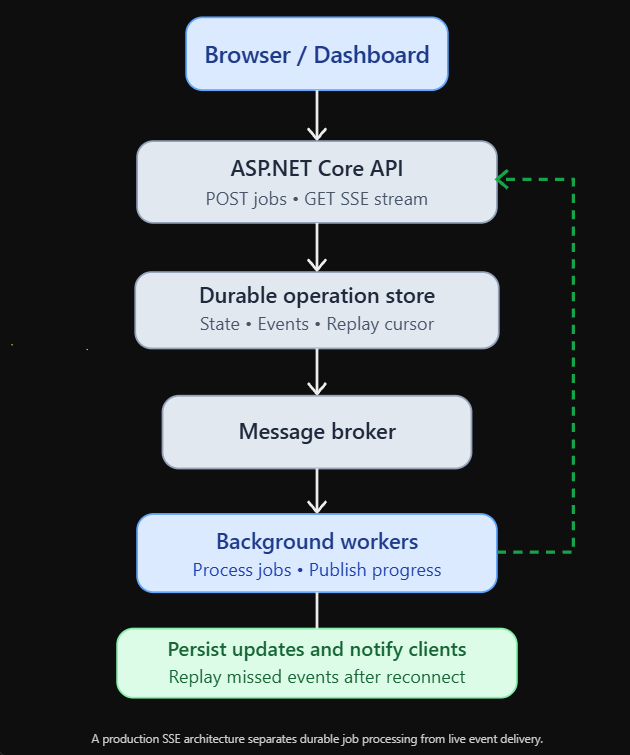
A production SSE architecture separates durable job processing from live event delivery.
The browser submits work using an ordinary HTTP request.
The API accepts the operation and stores it durably.
Workers process the job.
Progress updates are persisted or published according to the application’s delivery guarantees.
The SSE layer delivers updates to connected clients.
If the browser disconnects, the job continues.
If the browser reconnects, it can retrieve current state or replay missed events.
If one API instance fails, another can serve the client using shared infrastructure.
This is the difference between a simple demonstration and a resilient real-time system.
Common Mistakes to Avoid
One common mistake is treating SSE as a replacement for every real-time communication technology.
SSE is excellent for server-to-client updates, but it is not a bidirectional messaging protocol.
Another mistake is assuming automatic reconnection guarantees that no events will be lost. It doesn’t. Replay requires server-side support.
Developers also sometimes use a single channel with multiple readers and expect every client to receive every event. In a normal channel, readers compete for messages rather than receiving independent copies.
Unbounded subscriber buffers can cause memory growth when clients are slow.
Missing cancellation handling can leave abandoned subscriptions.
Incorrect proxy configuration can delay events or terminate connections.
A production deployment may also fail when subscriptions are stored only in memory and the application scales across multiple instances.
Finally, developers sometimes stream sensitive information without verifying that each subscriber is authorized to receive it.
These mistakes are avoidable when event delivery, durability, security, and connection management are treated as separate design concerns.
When Should You Choose SSE?
SSE is a strong choice when the application needs to send continuous or occasional updates from the server to a browser.
Examples include background-job progress, live analytics dashboards, operational monitoring, order status changes, notifications, stock-price displays, and activity feeds.
It is particularly attractive when the frontend already uses HTTP APIs and doesn’t require continuous two-way messaging.
For infrequent updates, ordinary polling may still be simpler.
For interactive chat, collaborative editing, multiplayer experiences, or other bidirectional workflows, SignalR or WebSockets may be more appropriate.
For critical events that must survive disconnections, SSE should be paired with durable storage and replay.
The transport is only one part of the architecture.
Coming Next
In our next article, we’ll explore Building Backend-for-Frontend APIs with ASP.NET Core: APIs Designed for Web, Mobile, and Devices.
Modern applications often serve multiple types of clients.
A desktop browser may need detailed data and rich interactions.
A mobile application may require smaller responses and fewer network requests.
An IoT device may need compact, purpose-built endpoints.
Trying to serve every client through the same general-purpose API can create unnecessary complexity.
We’ll explore how Backend-for-Frontend (BFF) architectures solve this problem by introducing client-specific API layers, improving data aggregation, authentication boundaries, response shaping, and overall application performance.
Closing Thoughts
Server-Sent Events offer a straightforward way to make ASP.NET Core applications feel more responsive.
Instead of asking the server repeatedly whether something has changed, clients can open a stream and receive updates as they happen.
The protocol is simple.
It uses standard HTTP.
Browsers provide native support through EventSource.
Named events, event IDs, reconnection hints, and heartbeats provide useful building blocks for real-time delivery.
But production reliability requires more than opening a streaming connection.
Applications must handle disconnections, manage slow consumers, secure subscriptions, configure proxies, distribute events across multiple instances, and decide whether missed events need replay.
For long-running operations, SSE works particularly well alongside the HTTP 202 Accepted pattern.
The API accepts work.
A background worker processes it.
SSE keeps the user informed.
The operation’s durable state remains available even when the stream disconnects.
The real value of SSE is not simply that updates arrive instantly. It is that applications can deliver timely information without forcing clients to repeatedly ask for it.
Used in the right architecture, Server-Sent Events provide a lightweight, efficient, and maintainable foundation for real-time experiences in ASP.NET Core.
Subscribe Now
Building modern ASP.NET Core applications requires more than writing endpoints. It means understanding how applications communicate, scale, recover, and deliver reliable experiences to users.
Subscribe to ASP Today for practical .NET tutorials, production architecture guides, and advanced development strategies.
Join our Substack Chat to discuss Server-Sent Events, real-time streaming, background processing, SignalR, and the challenges of building scalable ASP.NET Core applications.
Subscribe now and follow the series as we continue building better, faster, and more reliable .NET applications.