

Your ASP.NET Core application may have excellent authentication, carefully designed authorization policies, encrypted connections, and comprehensive input validation. But what happens if a NuGet package used by the application is compromised?

What if a dependency contains a known vulnerability, a build pipeline downloads an unexpected package version, or a container image includes outdated system libraries? Modern applications depend on much more than the code developers write themselves. Every external package, build tool, container image, and deployment artifact becomes part of the software supply chain. Securing that chain means understanding where dependencies originate, verifying what enters the build, detecting vulnerabilities, documenting software components, and protecting the integrity of releases.
In this guide, we’ll build a practical software supply chain security workflow for ASP.NET Core using NuGet auditing, centralized package management, Software Bills of Materials (SBOMs), package signing, container scanning, and secure CI/CD practices.
The Security Risk Hidden Behind a Successful Build
Imagine a financial reporting platform built with ASP.NET Core.
The application processes transactions, generates monthly reports, communicates with external payment services, and provides dashboards for administrators.
Its developers follow established security practices.
Authentication is protected.
Database queries are parameterized.
Sensitive information is stored securely.
The team regularly reviews its own code.
As we explored in our earlier guide on Security Best Practices in ASP.NET Core, protecting an application requires multiple layers of defense. Secure authentication, authorization, and input validation protect application behavior, while software supply chain security extends those protections to the external packages, build tools, and infrastructure the application depends on.
Everything appears secure.
Then a developer adds a new NuGet package to simplify document generation.
The package works.
The tests pass.
The application builds successfully.
But the package depends on another library containing a known vulnerability.
That library depends on several additional components.
Suddenly, the application includes software that the development team never directly selected or reviewed.
This is the challenge of software supply chain security.
A successful build tells us that the compiler and build tools completed their work.
It does not prove that every dependency is trustworthy, that every artifact came from an approved source, or that the resulting application is free from known vulnerabilities.
We need additional controls.
What Is a Software Supply Chain?
A software supply chain includes the components, systems, and processes involved in creating and delivering software.
For an ASP.NET Core application, that chain typically includes source code, NuGet packages, transitive dependencies, SDKs, build tools, CI/CD runners, container base images, artifact registries, and deployment infrastructure.
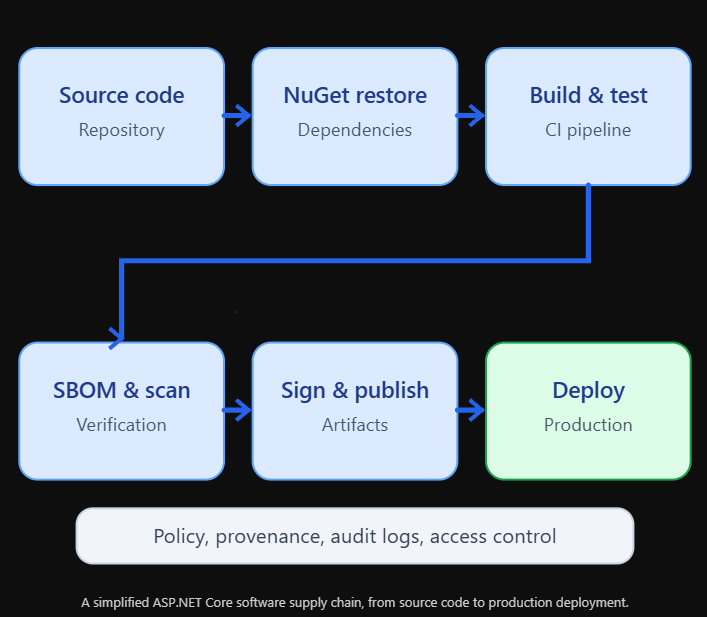
Every stage introduces potential risks.
A source repository may be compromised.
A package may be malicious or vulnerable.
A build runner may expose credentials.
An artifact may be replaced after testing.
A container may contain vulnerable operating system packages.
A deployment pipeline may release an unverified artifact.
Software supply chain security attempts to reduce these risks through controls applied throughout the delivery process.
Direct Dependencies Versus Transitive Dependencies
Let’s begin with NuGet.
An ASP.NET Core project might reference several packages directly.
<ItemGroup>
  <PackageReference
      Include="Microsoft.EntityFrameworkCore.SqlServer"
      Version="10.0.0" />

  <PackageReference
      Include="Serilog.AspNetCore"
      Version="10.0.0" />
</ItemGroup>
These are direct dependencies.
But the packages may require other packages to function.
Those additional packages are transitive dependencies.
For example:
FinancialReporting.Api
    |
    +-- Package A
    |      |
    |      +-- Package B
    |             |
    |             +-- Package C
    |
    +-- Package D
           |
           +-- Package E
The application directly references Packages A and D.
But Packages B, C, and E may also become part of the resolved dependency graph.
A vulnerability in Package C can affect the application even though the developer never added Package C explicitly.
This is why reviewing only the package references in the project file is insufficient.
We need visibility into the complete dependency graph.
Step 1: Inspect the Dependency Graph
The .NET SDK provides commands for inspecting project dependencies.
For .NET 10, use:
dotnet package listTo include transitive dependencies:
dotnet package list --include-transitiveFor older SDK versions, the equivalent command commonly uses:
dotnet list package --include-transitiveThe output identifies packages resolved for the project, including their versions.
This helps answer important questions.
Which packages does the application use?
Which versions were selected?
Are unexpected packages present?
Do multiple projects depend on different versions of the same library?
However, the package list is only the starting point.
A complete security workflow must also examine known vulnerabilities, package origins, and build integrity.
Step 2: Audit NuGet Dependencies
NuGet supports auditing dependencies against known vulnerability information.
For a .NET 10 project, configure auditing explicitly:
<PropertyGroup>
  <NuGetAudit>true</NuGetAudit>
  <NuGetAuditLevel>moderate</NuGetAuditLevel>
  <NuGetAuditMode>all</NuGetAuditMode>
</PropertyGroup>
NuGetAudit enables auditing during restore.
NuGetAuditLevel controls the minimum vulnerability severity reported.
NuGetAuditMode controls whether auditing covers direct dependencies or the broader dependency graph.
The all setting is especially useful because transitive dependencies can introduce significant risk.
Then run:
dotnet restoreNuGet can report vulnerabilities associated with resolved package versions.
You can also request a vulnerability-focused listing:
dotnet package list --vulnerable --include-transitiveA vulnerability report is not proof that an application is exploitable.
A vulnerable function may not be reachable in the application’s execution path.
But a report identifies a risk that requires investigation.
The next step is to determine whether the dependency can be updated, replaced, removed, or otherwise mitigated.
Understanding Vulnerability Severity
Vulnerability advisories often classify issues by severity.
Severity           Typical response
Critical           Immediate investigation and prioritized remediation
High               Urgent remediation based on exposure
Moderate           Scheduled remediation with risk assessment
Low                Track and resolve according to policy
Severity alone is not enough.
Consider two vulnerabilities.
The first affects a package used only by an internal development utility.
The second affects an internet-facing request-processing component.
Even if their reported severities are similar, the operational risks may differ substantially.
A useful assessment considers exploitability, exposure, affected functionality, available fixes, and business impact.
For a financial reporting application, a vulnerability that could expose customer data deserves particular attention.
The objective is not simply to eliminate warning messages.
It is to reduce meaningful security risk.
Step 3: Centralize NuGet Package Versions
Large ASP.NET Core solutions often contain multiple projects.
For example:
FinancialPlatform/
    |
    +-- FinancialPlatform.Api/
    +-- FinancialPlatform.Application/
    +-- FinancialPlatform.Infrastructure/
    +-- FinancialPlatform.Worker/
    +-- FinancialPlatform.Tests/
If every project declares package versions independently, version drift becomes more likely.
One project may use an older logging library.
Another may use a newer version.
A third may reference an outdated database provider.
Central Package Management helps maintain consistency.
Create a Directory.Packages.props file at the solution root.
<Project>
  <PropertyGroup>
    <ManagePackageVersionsCentrally>
      true
    </ManagePackageVersionsCentrally>
  </PropertyGroup>

  <ItemGroup>
    <PackageVersion
        Include="Microsoft.EntityFrameworkCore.SqlServer"
        Version="10.0.0" />

    <PackageVersion
        Include="Serilog.AspNetCore"
        Version="10.0.0" />
  </ItemGroup>
</Project>
Individual projects can reference packages without specifying versions.
<ItemGroup>
  <PackageReference
      Include="Microsoft.EntityFrameworkCore.SqlServer" />

  <PackageReference
      Include="Serilog.AspNetCore" />
</ItemGroup>
This makes dependency versions easier to review and update.
Central management does not automatically make packages secure.
But it reduces configuration inconsistency and creates a clearer place for dependency governance.
Step 4: Use NuGet Lock Files
Even with centralized package versions, applications need a reproducible dependency resolution process.
NuGet lock files record the resolved package dependency graph.
Enable them in the project:
<PropertyGroup>
  <RestorePackagesWithLockFile>
    true
  </RestorePackagesWithLockFile>
</PropertyGroup>
Then restore:
dotnet restoreNuGet generates a packages.lock.json file.
For application projects, commit the lock file to source control.
In CI, use locked mode:
dotnet restore --locked-modeLocked mode verifies that the resolved dependencies match the lock file.
If project dependency requirements change without an appropriate lock file update, restore fails rather than silently changing the locked graph.
This improves reproducibility.
But lock files are not cryptographic proof that a package publisher is trustworthy.
They also do not replace package auditing or artifact verification.
They solve a different problem: ensuring that dependency resolution remains consistent with the reviewed state.
Step 5: Control Package Sources
NuGet can restore packages from public and private feeds.
A typical enterprise application might use both.
For example:
nuget.org
    |
    +-- Public libraries

Company package feed
    |
    +-- Internal shared libraries
This creates a dependency confusion risk.
Suppose an internal application references a package named:
Company.Financial.CoreIf the build environment also searches a public feed for that package name, an attacker may attempt to publish a malicious package using the same identifier.
Package Source Mapping helps control which package IDs are allowed to come from which sources.
Create a NuGet.Config file:
<?xml version="1.0" encoding="utf-8"?>

<configuration>
  <packageSources>
    <clear />

    <add
      key="nuget.org"
      value="https://api.nuget.org/v3/index.json" />

    <add
      key="company"
      value="https://packages.example.com/v3/index.json" />
  </packageSources>

  <packageSourceMapping>
    <packageSource key="nuget.org">
      <package pattern="*" />
    </packageSource>

    <packageSource key="company">
      <package pattern="Company.*" />
    </packageSource>
  </packageSourceMapping>
</configuration>
This demonstrates the configuration structure, but the patterns overlap.
Because * matches all packages, a more specific Company.* mapping takes precedence for those IDs under NuGet’s source mapping rules.
For stronger control, define explicit ownership conventions and test how the mappings resolve in your environment.
An even clearer policy can use distinct internal package prefixes and carefully scoped public package mappings.
The objective is to ensure that internal packages cannot unexpectedly resolve from an untrusted public source.
Why Package Provenance Matters
Knowing a package’s name and version is not the same as knowing its origin.
Consider:
Company.Financial.Core 4.2.0The version number alone does not answer:
Who published the package?
Which source repository produced it?
Which build pipeline created it?
Was the artifact modified after the build?
Was it approved for release?
These questions concern provenance.
Provenance describes where an artifact came from and how it was produced.
A mature software supply chain records provenance information and uses it to make release decisions.
For internal packages, this may include source commit identifiers, build workflow identities, artifact digests, and attestations.
For third-party packages, teams should evaluate the trustworthiness of the publisher, package source, maintenance practices, and available integrity information.
Step 6: Understand NuGet Package Signing
NuGet supports signed packages.
Package signing provides cryptographic information that can help verify package integrity and signer identity.
This is useful because a package can be distributed through several systems before reaching the application build.
A signed package contains signature information that can be validated against the appropriate trust requirements.
But signing has limitations.
A valid signature does not prove that a package contains safe code.
A malicious publisher can sign a malicious package.
A legitimate publisher can accidentally release vulnerable code.
Signing helps answer questions about integrity and identity.
It does not replace code review, vulnerability analysis, or publisher assessment.
Verifying Package Signatures
NuGet provides signature verification capabilities.
For example:
dotnet nuget verify package.nupkgA stricter verification workflow can use:
dotnet nuget verify package.nupkg --allThe exact verification behavior depends on the SDK, platform trust configuration, and signature requirements.
Organizations should establish policies defining which signatures and trust chains are acceptable.
Verification should occur in controlled build environments with appropriate trust configuration.
Do not assume that successfully downloading a package means its origin and integrity satisfy your organization’s requirements.
Step 7: Create a Software Bill of Materials
Now let’s address one of the most important supply chain security tools.
An SBOM, or Software Bill of Materials, is an inventory of software components.
Think of it as an ingredient list for an application.
A packaged food product lists its ingredients.
An SBOM lists the software components that contribute to a release.
For an ASP.NET Core application, an SBOM may include NuGet dependencies, runtime components, operating system packages, and other relevant software.
Common SBOM formats include SPDX and CycloneDX.
An SBOM helps organizations understand what is inside a software release.
This becomes especially valuable when a new vulnerability is disclosed.
Instead of manually inspecting hundreds of repositories, a security team can search its SBOM inventory to identify potentially affected applications.
A Simple SBOM Example
An SBOM is a structured document.
A simplified CycloneDX-style example might look like this:
{
  "bomFormat": "CycloneDX",
  "specVersion": "1.6",
  "version": 1,
  "components": [
    {
      "type": "library",
      "name": "Microsoft.EntityFrameworkCore.SqlServer",
      "version": "10.0.0",
      "purl": "pkg:nuget/[email protected]"
    },
    {
      "type": "library",
      "name": "Serilog.AspNetCore",
      "version": "10.0.0",
      "purl": "pkg:nuget/[email protected]"
    }
  ]
}
This is an illustrative fragment, not a complete release SBOM.
A real SBOM may contain component identifiers, dependency relationships, hashes, licenses, metadata, and other information.
The format makes the inventory machine-readable.
Security tools can then compare components against vulnerability databases and policy requirements.
Step 8: Generate an SBOM for an ASP.NET Core Project
One option is to use a maintained CycloneDX tool for .NET.
Install the tool using the version approved by your organization.
For example:
dotnet tool install --global CycloneDXThen generate an SBOM for the solution:
dotnet CycloneDX FinancialPlatform.sln \
    -o ./sbom
Tool options and supported formats can vary by release, so verify the command against the installed tool version.
For production workflows, pin the tool version rather than allowing the build to install an unreviewed latest release.
The generated SBOM should be associated with the specific application build.
That distinction is important.
An SBOM generated from the current source tree may not describe an older artifact already running in production.
A useful SBOM identifies the components of a particular release.
Source SBOMs Versus Deployment SBOMs
A source-level dependency inventory and a deployed application inventory are not always identical.
Consider an ASP.NET Core application packaged into a Linux container.
The .NET project may use several NuGet packages.
But the final container also contains operating system libraries and runtime components.
Those components may introduce vulnerabilities unrelated to NuGet.
For example:
ASP.NET Core application
    |
    +-- NuGet dependencies
    |
    +-- .NET runtime components
    |
    +-- Linux operating system packages
    |
    +-- Native libraries
An SBOM generated only from the .NET solution may not include everything in the deployed container.
For stronger coverage, generate or obtain an SBOM for the final container image as well.
This gives the security team visibility into the software that actually reaches production.
Step 9: Scan the Container Image
Suppose the application uses a Dockerfile:
FROM mcr.microsoft.com/dotnet/sdk:10.0 AS build

WORKDIR /src

COPY . .

RUN dotnet restore

RUN dotnet publish \
    -c Release \
    -o /app/publish \
    --no-restore

FROM mcr.microsoft.com/dotnet/aspnet:10.0

WORKDIR /app

COPY --from=build \
    /app/publish .

ENTRYPOINT ["dotnet", "FinancialPlatform.Api.dll"]
This is a simplified multi-stage Dockerfile.
The SDK image builds the application.
The runtime image hosts it.
In our previous article on Native AOT in ASP.NET Core: Faster Startup, Smaller Containers, and the Trade-Offs, we explored how ahead-of-time compilation can reduce startup time and deployment size. Smaller artifacts can reduce unnecessary components, but they still require dependency auditing, vulnerability scanning, and regular security updates.
The final image does not need the entire SDK.
That reduces unnecessary build tooling in production.
However, the runtime image may still contain operating system components with vulnerabilities.
A container scanner can inspect the final image.
For example, using Trivy:
trivy image \
    --severity HIGH,CRITICAL \
    financial-platform:1.0.0
The scanner may identify vulnerable operating system packages and supported application dependencies.
The results should be reviewed against the actual deployment context.
A scan is a snapshot based on the vulnerability information available at that time.
A clean result today does not guarantee that the image will remain free of known vulnerabilities tomorrow.
Step 10: Pin Container Images by Digest
Container image tags are convenient.
For example:
FROM mcr.microsoft.com/dotnet/aspnet:10.0But tags can point to different image contents over time.
A digest identifies specific image content.
For reproducible builds, an organization can pin an approved image digest.
Conceptually:
FROM mcr.microsoft.com/dotnet/aspnet:10.0@sha256:REPLACE_WITH_APPROVED_DIGESTThe digest must be obtained from the actual trusted image and verified for the intended platform.
Do not copy an arbitrary digest from an unrelated environment.
Digest pinning helps ensure that the build uses the reviewed image content.
But it introduces a maintenance responsibility.
If a base image is pinned indefinitely, security updates may never reach the application.
A secure workflow combines digest pinning with regular image updates and vulnerability scanning.
Step 11: Secure the CI/CD Pipeline
The build pipeline is part of the software supply chain.
It can access source code, dependencies, package feeds, signing credentials, and deployment environments.
If an attacker compromises the pipeline, they may be able to produce or deploy malicious artifacts.
For that reason, CI/CD security deserves the same attention as application security.
A strong pipeline should use least-privilege permissions, protected branches, reviewed workflow changes, short-lived credentials where possible, and controlled access to secrets.
Build runners should be isolated appropriately.
Third-party build actions should be reviewed and pinned according to organizational policy.
Production deployments should require authorized workflows.
The pipeline should also record which source commit produced each release artifact.
Building a Secure GitHub Actions Workflow
Let’s create a simplified ASP.NET Core CI workflow.
name: ASP.NET Core Supply Chain Security

on:
  push:
    branches: [main]

  pull_request:
    branches: [main]

permissions:
  contents: read

jobs:
  build:
    runs-on: ubuntu-latest

    steps:
      - name: Checkout
        uses: actions/checkout@v4

      - name: Setup .NET
        uses: actions/setup-dotnet@v4
        with:
          dotnet-version: '10.0.x'

      - name: Restore dependencies
        run: dotnet restore --locked-mode

      - name: List vulnerable packages
        run: >
          dotnet package list
          --vulnerable
          --include-transitive

      - name: Build
        run: >
          dotnet build
          --configuration Release
          --no-restore

      - name: Test
        run: >
          dotnet test
          --configuration Release
          --no-build

      - name: Publish
        run: >
          dotnet publish
          FinancialPlatform.Api/FinancialPlatform.Api.csproj
          --configuration Release
          --no-build
          --output ./publish
This workflow demonstrates the basic structure.
For production use, pin third-party actions to reviewed commit SHAs, configure package audit enforcement, and add SBOM generation, artifact verification, and deployment controls.
Also note that dotnet package list --vulnerable is a reporting command.
Its presence alone does not guarantee that every vulnerability causes the pipeline to fail.
Security gates must be configured deliberately.
Step 12: Turn Audit Results Into Build Policies
A security workflow should define what happens when a vulnerability is discovered.
For example, an organization may require all critical and high-severity vulnerabilities to be investigated before release.
Some findings may require immediate remediation.
Others may receive a documented exception after a risk assessment.
A practical policy might look like this:
Finding                      Pipeline action
Critical vulnerability       Block release unless formally approved
High vulnerability           Block or require documented exception
Moderate vulnerability       Track remediation deadline
Unapproved package source    Fail restore or policy validation
Missing SBOM                 Block production release
Unverified artifact          Block deployment
These are example organizational policies, not defaults enforced automatically by .NET.
The implementation may involve NuGet warnings-as-errors, dedicated vulnerability scanners, policy-as-code tooling, and CI checks.
One important consideration is avoiding broad suppression.
Disabling all security warnings because one advisory is inconvenient can hide future problems.
Exceptions should be specific, documented, reviewed, and time-limited.
Step 13: Treat Build Artifacts as Immutable
Suppose the pipeline builds an ASP.NET Core application.
It runs tests.
It generates an SBOM.
It scans the container.
Everything passes.
Then a deployment script rebuilds the application from source.
That new build may resolve different inputs or run under different conditions.
The artifact deployed to production is no longer necessarily the artifact that was tested.
A stronger approach is to build once and promote the same verified artifact through environments.
Source commit
     |
     v
Build artifact
     |
     v
Test and scan
     |
     v
Sign and attest
     |
     v
Staging
     |
     v
Production
The artifact should retain a stable digest.
Deployment systems can verify that the artifact matches the approved release.
This reduces the risk of changes between testing and deployment.
Step 14: Understand Artifact Signing and Attestations
Package signing and artifact signing are related but distinct.
NuGet package signing helps verify package integrity and signer information.
Artifact signing can protect the integrity of the application package or container image produced by the organization’s own pipeline.
An attestation provides a statement about an artifact.
For example, an attestation may associate an artifact digest with a build workflow, source repository, and build environment.
Tools and ecosystems such as Sigstore and SLSA provide approaches for improving artifact identity and provenance.
A mature release workflow can use these mechanisms to establish stronger trust in the software being deployed.
But a signature is only meaningful when the verifier checks the expected identity and trust policy.
Accepting any cryptographically valid signature is not equivalent to verifying that an artifact came from an approved build process.
Step 15: Separate Build and Deployment Permissions
A common mistake is giving the build pipeline broad access to production.
For example, a workflow that runs on every pull request should not have unrestricted deployment credentials.
A safer design separates responsibilities.
The build job compiles and tests code.
The security job scans dependencies and artifacts.
The release job creates approved artifacts.
The deployment job uses narrowly scoped permissions to deploy those artifacts.
Where supported, short-lived identity-based credentials are preferable to long-lived secrets stored in CI configuration.
This reduces the damage an attacker can cause if a build job or third-party action is compromised.
Step 16: Monitor Dependencies After Deployment
Supply chain security does not end when an application is released.
A dependency that was considered safe during deployment may receive a vulnerability advisory later.
Suppose the financial reporting platform deployed version 4.2.0 last month.
A new vulnerability is disclosed in a transitive package today.
The organization needs to answer:
Which applications use the affected package?
Which deployed versions contain it?
Which environments are affected?
Who owns remediation?
How quickly can a corrected release be deployed?
SBOM inventories help answer these questions.
They allow teams to associate known components with specific releases.
Combined with vulnerability monitoring and asset inventories, they make post-deployment response more efficient.
Step 17: Automate Dependency Updates Carefully
Keeping dependencies current reduces exposure to known vulnerabilities.
Tools such as Dependabot and Renovate can propose dependency updates automatically.
For example, Dependabot can monitor NuGet dependencies using a configuration file.
version: 2

updates:
  - package-ecosystem: "nuget"
    directory: "/"
    schedule:
      interval: "weekly"
This example is a starting point.
The actual configuration should match the repository structure and update policy.
Automated updates should still pass through testing and review.
A newer package version is not automatically safer in every respect.
Updates can introduce breaking changes, behavioral differences, or new dependencies.
The goal is to reduce the time between identifying a risk and safely deploying a fix.
The Risk of Abandoned Packages
Not every dependency is actively maintained.
A package may continue to work for years without receiving updates.
That does not necessarily mean it is vulnerable.
But abandoned packages introduce long-term maintenance risks.
If a vulnerability is discovered, there may be no maintainer available to release a fix.
Before adopting a dependency, consider its maintenance activity, release history, ownership, licensing, and security response practices.
For critical functionality, organizations may prefer dependencies with clear maintenance commitments.
In some cases, replacing a small external package with carefully reviewed internal code may reduce long-term risk.
However, writing custom implementations of complex security functionality can introduce greater risk.
Dependency reduction should be based on technical judgment, not a blanket assumption that fewer packages always mean better security.
Evaluating a New NuGet Package
Let’s return to our financial reporting platform.
A developer proposes adding a new document-processing library.
Before approving the dependency, the team evaluates several factors.
Does the package come from an expected source?
Is the publisher identifiable?
Is the package maintained?
Does it have known vulnerabilities?
What transitive dependencies does it introduce?
Does its license satisfy organizational requirements?
Does it need unusual permissions or access to sensitive resources?
Could an existing approved dependency provide the same functionality?
This review does not need to become a lengthy manual process for every minor library.
Organizations can automate much of the evidence collection and apply deeper review to higher-risk dependencies.
The important point is that dependency adoption should be an intentional engineering decision.
SBOMs and License Compliance
SBOMs are useful beyond vulnerability management.
They can also support software license compliance.
An ASP.NET Core application may include dependencies distributed under different licenses.
Some licenses impose obligations concerning attribution, distribution, or source availability.
An SBOM can help identify which components require review.
However, an SBOM is not a legal determination.
License metadata may be incomplete or incorrect.
Organizations should use SBOM information as an input to their compliance process, not as a replacement for appropriate legal and licensing review.
Protecting Internal NuGet Packages
Many enterprise ASP.NET Core solutions use internal shared libraries.
For example:
Company.Security
Company.Logging
Company.Messaging
Company.DataAccess
These packages may be distributed through private feeds.
Internal packages deserve the same supply chain protections as public dependencies.
Use controlled publishing permissions.
Require reviewed source changes.
Build packages through approved pipelines.
Record package versions and provenance.
Protect package feed credentials.
Prevent unauthorized replacement of published artifacts.
Where supported, use immutable package versions and retention policies that preserve released artifacts.
A private package feed is not automatically secure simply because it is private.
Its publishing and access controls determine how trustworthy it is.
Protecting Secrets in the Build Pipeline
As discussed in Configuration at Scale in ASP.NET Core: Dynamic Settings, Validation, and Safe Reloading, managing application configuration safely becomes increasingly important as systems grow. The same principle applies to build pipelines, where credentials, package feed access, and deployment settings must be separated from source code and managed through controlled, auditable mechanisms.
Build pipelines often need access to private feeds and cloud services.
That access should not require embedding passwords in project files or repository configuration.
Avoid placing credentials directly in NuGet.Config.
Instead, use supported credential providers or secure CI secret mechanisms.
Prefer short-lived credentials when available.
Limit each credential to the resources and actions it requires.
Prevent secrets from appearing in build logs.
Be especially cautious when running workflows triggered by untrusted pull requests.
An attacker who can execute arbitrary code in a privileged build environment may be able to access credentials or modify build outputs.
Incident Response for a Compromised Dependency
Suppose a widely used NuGet package is found to contain malicious code.
What should the organization do?
First, identify affected applications and deployed versions.
Second, determine whether the malicious version was actually restored, built, or deployed.
Third, investigate the potential impact.
Fourth, block further use of the compromised package.
Fifth, rebuild affected applications using verified dependencies.
Sixth, rotate credentials or take other containment measures if the package could have accessed sensitive information.
Finally, review how the dependency entered the environment and improve the controls that failed to prevent or detect it.
SBOMs, lock files, package inventories, and build provenance can make this response significantly faster.
Without them, teams may spend critical hours reconstructing which software components were used.
A Practical Supply Chain Security Checklist
Before deploying an ASP.NET Core application, verify that the following controls are in place.
Direct and transitive NuGet dependencies are inventoried.
Known dependency vulnerabilities are audited.
Package versions are centrally managed where appropriate.
Lock files are used for reproducible application restores.
Package sources are controlled and reviewed.
Internal packages have protected publishing workflows.
An SBOM is generated for each release.
Container images are scanned and regularly updated.
Build artifacts are traceable to source commits.
Release artifacts are verified before deployment.
CI/CD permissions follow least-privilege principles.
Dependency updates and vulnerability monitoring continue after deployment.
Security exceptions are documented and time-limited.
Incident response procedures cover compromised dependencies.
This checklist is not a certification standard.
It is a practical starting point for establishing consistent software supply chain controls.
Bringing Everything Together: A Production-Ready Supply Chain
Let’s combine these practices into a realistic delivery process for our financial reporting platform.
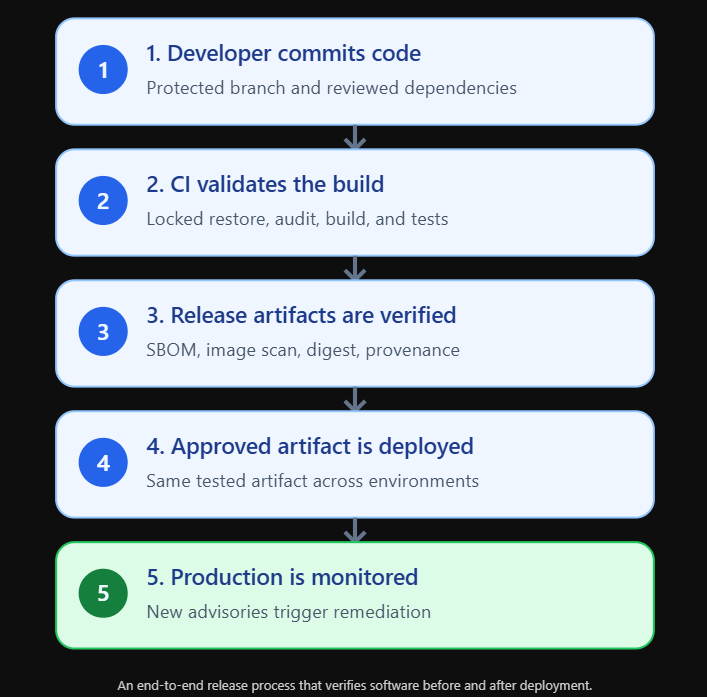
The development team manages NuGet versions centrally using Directory.Packages.props.
Application projects commit their dependency lock files.
Every pull request triggers dependency auditing, compilation, and automated tests.
Package Source Mapping restricts where internal packages can be restored from.
When a change is merged into the protected main branch, an approved build pipeline creates the application artifact.
The pipeline generates an SBOM, scans the final container image, and records the source commit and artifact digest.
The release process applies the organization’s vulnerability and compliance policies.
Approved artifacts are signed or accompanied by verifiable provenance attestations.
The deployment system promotes the same tested artifact into staging and production.
After deployment, vulnerability monitoring continues.
When a new advisory affects a dependency, the team can identify the affected application versions and prioritize remediation.
The result is not an application guaranteed to be free of vulnerabilities.
No build pipeline can provide that guarantee.
Instead, the organization gains something more practical: a repeatable, auditable process for understanding, verifying, and managing the software it releases.
That is the foundation of effective software supply chain security.
Coming Next
In our next article, we’ll explore Content Security Policy in ASP.NET Core: Protecting Web Applications Against Browser-Based Attacks.
Even applications with strong authentication and carefully managed dependencies can be vulnerable to attacks executed inside the browser.
Cross-site scripting, malicious third-party scripts, unsafe inline JavaScript, and improperly configured content sources can expose users to serious security risks.
We’ll explore how Content Security Policy (CSP) helps reduce these risks, how to configure security headers in ASP.NET Core, and how to introduce strict policies without breaking legitimate application functionality.
We’ll also build practical examples using nonces, hashes, report-only policies, and production monitoring.
Closing Thoughts
Software supply chain security is no longer an optional concern reserved for large technology companies.
Every modern ASP.NET Core application depends on software produced by other developers, organizations, and infrastructure providers.
NuGet packages simplify development.
Container images simplify deployment.
CI/CD pipelines accelerate delivery.
But each introduces dependencies and trust relationships that developers must understand.
A secure application requires more than reviewing its own source code.
It requires knowing which components enter the build, where they come from, how they are verified, and which artifacts eventually reach production.
NuGet auditing helps identify known dependency vulnerabilities.
Central Package Management and lock files improve dependency consistency and reproducibility.
Package signing and provenance controls help establish artifact integrity and origin.
SBOMs make software components visible and support faster vulnerability response.
Container scanning extends that visibility into the deployment environment.
And secure CI/CD pipelines connect these practices into a controlled release process.
The most important principle is simple: Don’t just secure the code you write. Secure the software you depend on and the process that delivers it.
Subscribe Now
Modern ASP.NET Core development involves much more than writing controllers, building APIs, and deploying applications.
It also requires understanding the security, reliability, and operational practices that keep production systems trustworthy.
Subscribe to ASP Today for practical .NET tutorials, real-world architecture examples, and production-focused security guidance.
Join our Substack Chat to discuss NuGet dependency management, SBOMs, secure build pipelines, container security, and the challenges of protecting modern software supply chains.
Subscribe now and follow the series as we continue building secure, reliable, and production-ready ASP.NET Core applications.