

Cloud computing transformed the way we build applications by giving us centralized infrastructure that can scale almost instantly. But sending every request and every piece of data back to a distant cloud region is not always the best solution. Some applications need extremely fast responses, must continue working when connectivity disappears, or generate so much data that constantly sending everything to the cloud becomes inefficient. Edge computing addresses these challenges by moving part of the application closer to the people, devices, and machines using it.
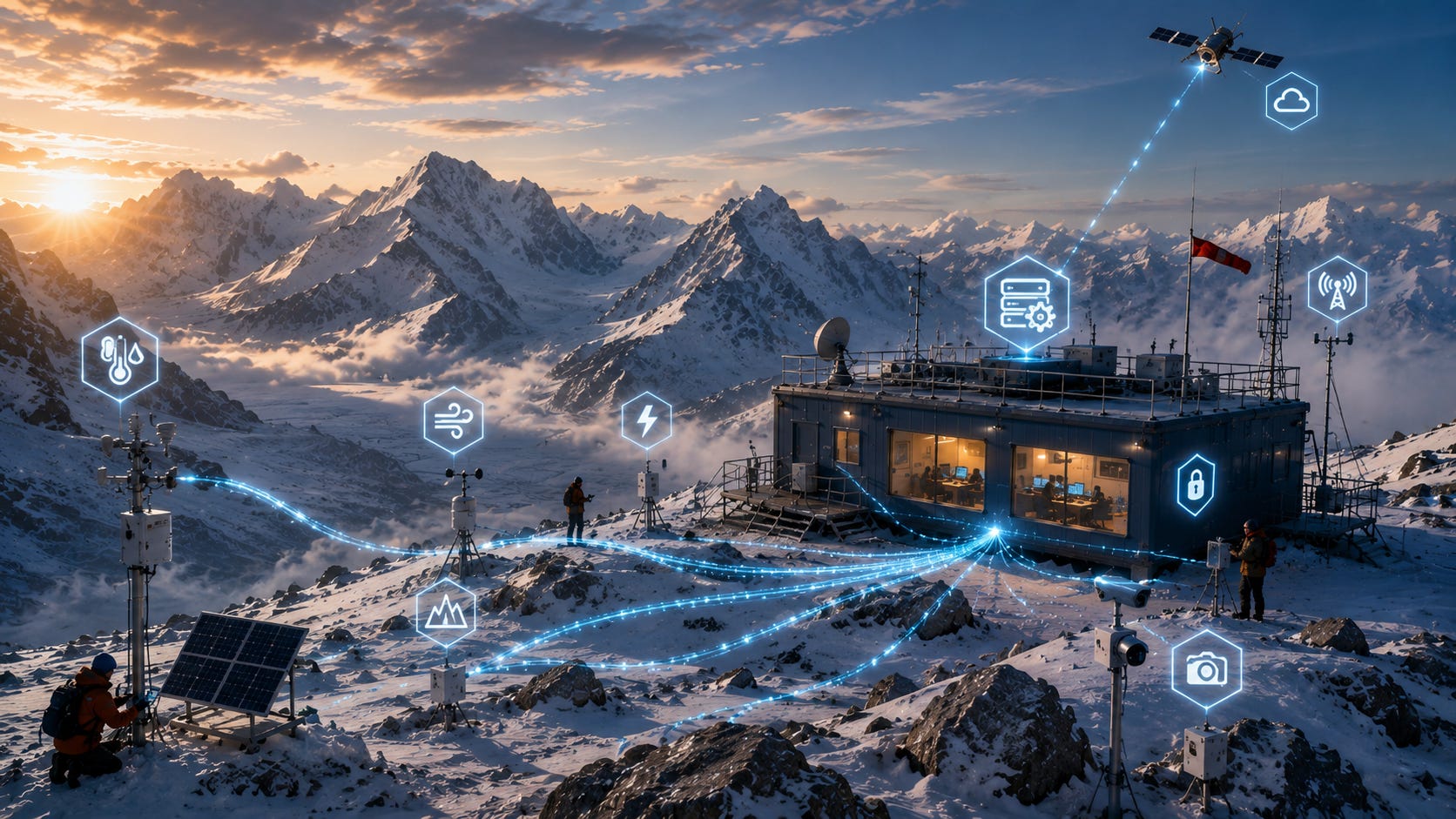
In this guide, we’ll explore what edge computing means for ASP.NET Core developers, where it makes sense, how edge and cloud systems work together, and how to design practical applications that remain fast, secure, and resilient.
What Does “The Edge” Actually Mean?
We’ve spent years moving applications into the cloud.
Now we’re talking about moving some of them back?
Not exactly.
Edge computing does not mean abandoning the cloud. It means deciding where each piece of work should happen.
Imagine a factory in Germany sending sensor readings to a cloud data center hundreds of kilometers away. If every machine decision requires a round trip to that cloud, network latency and connectivity become part of the production process.
Instead, the factory can run some application services locally.
Those services process important information immediately and send selected data to the cloud afterward.
That local computing environment is the edge.
The edge could be a small server in a factory, a computer inside a retail store, an industrial gateway, a regional data center, or another computing system located near the source of the data.
The exact hardware matters less than the architectural idea.
Move time-sensitive processing closer to where the data is created or consumed.
Cloud Computing vs Edge Computing
Traditional cloud architecture often looks like this:
Device
   │
   │ Internet
   ▼
Cloud Application
   │
   ▼
Cloud Database
Every important operation depends on reaching the cloud.
An edge architecture introduces another layer:
Device
   │
   ▼
Edge Application
   │
   ├── Local Processing
   ├── Local Storage
   └── Immediate Decisions
   │
   │ Internet
   ▼
Cloud Platform
The edge handles work that benefits from being local.
The cloud continues handling workloads that benefit from centralized infrastructure.
This distinction is important because edge computing and cloud computing are not competitors. In most real applications, they complement each other.
Why Put ASP.NET Core at the Edge?
ASP.NET Core is well suited to many edge scenarios because .NET runs across Windows and Linux, can be deployed in containers, provides high-performance web APIs, and includes mature support for dependency injection, configuration, background services, security, and observability.
An ASP.NET Core application running at an edge location might expose APIs to local devices, process incoming information, store temporary data, make immediate decisions, and periodically communicate with cloud services.
Developers can use many of the same programming patterns they already know.
The biggest difference is the environment.
At the edge, you cannot assume the network is always available.
The Latency Problem
Latency is the delay between sending a request and receiving a response.
For many business applications, a little network latency is perfectly acceptable.
If someone requests a monthly sales report, an extra fraction of a second probably does not matter.
But consider a manufacturing system detecting a dangerous machine condition.
Waiting for:
Machine
   ↓
Internet
   ↓
Cloud
   ↓
Analysis
   ↓
Internet
   ↓
Machine
may be unnecessary when the decision could happen locally.
With edge processing:
Machine
   ↓
Local ASP.NET Core Service
   ↓
Immediate Response
The cloud can receive the event afterward for analytics, reporting, and long-term storage.
Edge Computing Is About More Than Speed
Latency receives most of the attention, but it is only one reason to use edge computing.
Connectivity is another.
Imagine a delivery warehouse where handheld scanners depend entirely on a cloud API.
If the internet connection fails, workers may no longer be able to:
Scan packages
Locate inventory
Confirm collections
Record deliveries
An edge service inside the warehouse can keep those operations running locally.
When connectivity returns, the edge system synchronizes its data with the cloud.
That is a major architectural advantage.
Designing for Intermittent Connectivity
Cloud applications are often designed around an assumption:
The network is available.
Edge applications should make the opposite assumption:
The network will eventually fail.
That changes how we design software.
Instead of immediately sending every operation to the cloud, an edge application may record work locally.
For example:
public async Task RecordScanAsync(PackageScan scan)
{
    await _localRepository.SaveAsync(scan);

    await _syncQueue.EnqueueAsync(scan.Id);
}
The scan succeeds locally.
A background process can attempt cloud synchronization separately.
This prevents temporary connectivity problems from stopping the user’s work.
Background Synchronization
ASP.NET Core’s hosted services are useful for synchronization workloads.
A simplified worker might look like this:
public class CloudSyncWorker : BackgroundService
{
    private readonly ISyncService _syncService;

    public CloudSyncWorker(ISyncService syncService)
    {
        _syncService = syncService;
    }

    protected override async Task ExecuteAsync(
        CancellationToken stoppingToken)
    {
        while (!stoppingToken.IsCancellationRequested)
        {
            await _syncService.PushPendingChangesAsync(
                stoppingToken);

            await Task.Delay(
                TimeSpan.FromSeconds(30),
                stoppingToken);
        }
    }
}
Production synchronization is more complicated, but the pattern is straightforward.
Perform the user’s work locally first.
Synchronize with the central platform when possible.
Local Storage at the Edge
Once an application can operate offline, it usually needs local storage.
Depending on the workload, that might include a relational database, embedded database, local files, cache, or message queue.
The edge service might store:
Pending transactions
Device readings
Configuration
Product information
Inventory data
Synchronization state
The important question is not simply what database to choose.
You must decide which data belongs at the edge and which data remains authoritative in the cloud.
That distinction prevents synchronization from becoming chaotic.
Data Synchronization Gets Complicated
Suppose a retail store loses its internet connection.
While offline, the store sells the final item in stock.
At the same time, the online store sells what it believes is the same final item.
When the connection returns, two valid systems disagree.
Which one wins?
This is a synchronization conflict.
Edge systems need explicit rules for situations like this.
Possible strategies include timestamps, version numbers, optimistic concurrency, business-specific conflict resolution, or manual review.
There is no universal answer.
The correct strategy depends on what the data represents.
Idempotency Matters Again
Our earlier discussion of idempotency becomes particularly useful at the edge.
Suppose an edge application sends an order to the cloud.
The cloud processes it successfully, but the network disconnects before the edge receives the response.
Did the operation succeed?
The edge cannot know.
If it blindly retries, the customer could receive two orders.
An idempotency key allows the cloud service to recognize the repeated operation.
For example:
POST /orders
Idempotency-Key: 91d57e2f-2e8a-4b11
If the same request arrives again, the server can return the previous result rather than creating another order.
Reliable synchronization depends heavily on patterns like this.
Practical Use Case: Manufacturing
Factories are a natural environment for edge computing.
Modern equipment can generate enormous streams of sensor data.
Sending every temperature reading, vibration measurement, and machine event to the cloud may be unnecessary.
An edge ASP.NET Core application can collect the readings locally.
It can detect abnormal conditions immediately.
For example:
if (reading.Temperature > safetyLimit)
{
    await _machineController.StopAsync();
}
The edge application reacts immediately.
Meanwhile, summarized measurements and important events can still be sent to the cloud for long-term analytics.
Practical Use Case: Retail Stores
Imagine a supermarket with:
Checkout systems
Barcode scanners
Electronic price displays
Inventory terminals
If every interaction depends on the internet, a network outage could disrupt the entire store.
A local ASP.NET Core service can maintain essential product and pricing information.
Checkout operations continue.
Transactions are queued.
When connectivity returns, the store synchronizes with central systems.
The cloud still provides centralized management, but the store is no longer completely dependent on it.
Practical Use Case: Logistics
Delivery and logistics systems are another excellent example.
Warehouses may process thousands of package scans every hour.
A local edge application can validate scans, update warehouse state, coordinate sorting equipment, and maintain operations even during temporary cloud outages.
The central platform receives synchronized events as connectivity permits.
The warehouse gets responsiveness.
Head office gets centralized visibility.
Both benefit.
Practical Use Case: Remote Locations
Not every application runs in a city with excellent connectivity.
Consider:
Ships
Mines
Farms
Construction sites
Remote energy facilities
Network connections may be slow, expensive, intermittent, or unavailable.
Edge computing allows important operations to continue locally.
The cloud becomes a synchronization and management layer rather than a constant dependency.
Edge AI
Our previous article explored integrating AI and machine learning with ASP.NET Core.
Edge computing adds another interesting possibility.
Some AI inference can happen locally.
Imagine a manufacturing camera inspecting products on a conveyor belt.
Sending every image to the cloud introduces bandwidth usage and delay.
Instead, a local model can inspect the image.
Only unusual results might be uploaded.
The workflow becomes:
Camera
   ↓
Edge AI Model
   ↓
ASP.NET Core Service
   ↓
Immediate Decision
   ↓
Selected Results
   ↓
Cloud
This combination of AI and edge computing can be particularly useful when low latency, privacy, or bandwidth efficiency matters.
Containers at the Edge
Containers make edge deployment much easier.
An ASP.NET Core service can be packaged into a container and deployed consistently across many locations.
The same application image might run in:
50 stores
200 warehouses
1,000 industrial sites
Containers provide consistency, but deployment at this scale creates another challenge.
How do you update all those locations safely?
Managing Edge Deployments
Centralized management is essential.
You need to know:
Which application version each location runs
Whether deployments succeeded
Which devices are online
Whether an edge node is healthy
When updates failed
Updates should also tolerate interruptions.
If connectivity disappears halfway through an upgrade, the site should not become unusable.
Versioned deployments and rollback strategies become especially important.
Security at the Edge
Edge computing changes your security boundary.
A cloud server usually lives inside a carefully controlled data center.
An edge server might live:
Behind a checkout counter
Inside a warehouse
On a factory floor
In a remote cabinet
Someone may be able to physically access it.
That means security must account for both network and physical threats.
Sensitive information stored locally should be protected appropriately, credentials should not be hardcoded into deployments, and each edge node should have a strong identity.
Zero Trust at the Edge
Our earlier Zero Trust discussion applies particularly well here.
The cloud should not automatically trust an edge device simply because it belongs to the company.
Each device or service should authenticate itself.
Likewise, edge services should verify cloud endpoints.
This can involve certificates, managed identities where supported, short-lived credentials, or other workload identity mechanisms.
The principle remains simple:
Verify the identity of every participant rather than trusting its network location.
Protecting Local Data
Edge systems sometimes contain sensitive information.
That data may include:
Customer details
Transactions
Operational information
Authentication credentials
Encryption at rest becomes important, especially when hardware could be lost or stolen.
Data retention should also be considered carefully.
If an edge node only needs seven days of local information, keeping six months may create unnecessary risk.
Store only what the edge actually needs.
Observability at the Edge
Monitoring a cloud application is relatively straightforward because the infrastructure is continuously connected.
Edge environments are different.
A node might disappear for hours.
Does that mean the application failed?
Or did the internet connection fail?
Your observability strategy needs to distinguish between the two.
Useful signals include:
Application health
CPU and memory usage
Synchronization backlog
Last successful cloud connection
Local storage capacity
Application version
When connectivity returns, telemetry may also need to be uploaded in batches.
Distributed Tracing
Distributed tracing becomes interesting when a request begins at the edge and continues in the cloud.
A correlation or trace identifier can follow the operation across both environments.
For example:
Warehouse Scanner
      ↓
Edge API
      ↓
Local Queue
      ↓
Cloud Sync
      ↓
Order API
      ↓
Inventory Service
A distributed trace helps developers understand the complete journey.
OpenTelemetry remains valuable here, although telemetry collection needs to account for intermittent connections and buffering.
API Gateways and Edge Computing
Our recent API Gateway article focused on providing a central entrance to backend services.
Edge architectures may introduce gateways at multiple levels.
A local gateway might route requests between devices and edge services.
A cloud gateway handles requests entering the central platform.
The architecture could resemble:
Local Devices
      ↓
Edge Gateway
      ↓
ASP.NET Core Edge Services
      ↓
Cloud API Gateway
      ↓
Cloud Microservices
The same architectural concepts appear at different physical locations.
Service Meshes at the Edge
Our previous article explored service meshes.
In larger edge installations with multiple local services, mesh-style capabilities may also be useful for secure service-to-service communication, traffic management, and observability.
However, complexity matters.
A small store running two services probably does not need the same infrastructure as a Kubernetes cluster running hundreds of microservices.
Edge architecture rewards simplicity.
Every extra component must operate when connectivity is poor and remote troubleshooting is difficult.
What Should Stay in the Cloud?
Edge computing does not mean moving everything locally.
Centralized workloads often belong in the cloud.
Examples include:
Organization-wide analytics
Long-term storage
Central reporting
Model training
Cross-location coordination
Large-scale batch processing
The edge should handle workloads that genuinely benefit from proximity.
A useful question is:
What breaks if the connection to the cloud disappears for an hour?
The answer often reveals which capabilities belong locally.
Avoiding the “Mini Cloud Everywhere” Trap
A common mistake is recreating the entire cloud platform at every edge location.
That can become extremely expensive and difficult to operate.
Imagine maintaining dozens of databases, message brokers, monitoring systems, gateways, and orchestration platforms across hundreds of locations.
The operational burden grows quickly.
Instead, keep edge environments focused.
Run only the services necessary for local operation.
Centralize everything else where practical.
A Complete Edge Architecture
Imagine a chain of smart manufacturing facilities.
Each factory runs an ASP.NET Core edge service.
Locally it:
Receives machine telemetry.
Stores recent readings.
Detects safety conditions.
Controls local workflows.
Queues cloud synchronization.
The cloud platform:
Stores long-term data.
Compares performance across factories.
Trains predictive models.
Distributes configuration.
Provides central dashboards.
The two layers work together.
If the cloud disappears temporarily, the factory keeps operating.
When connectivity returns, synchronization resumes.
That is the real strength of edge architecture.
When You Probably Don’t Need Edge Computing
Not every application needs an edge layer.
A traditional business website serving users over the internet may work perfectly well from cloud infrastructure.
Adding edge services introduces:
Deployment complexity
Synchronization challenges
Additional security concerns
Remote monitoring requirements
More infrastructure to maintain
Use edge computing when there is a clear reason.
Low latency, intermittent connectivity, local autonomy, privacy, or bandwidth constraints are good reasons.
“Edge is popular” is not.
How This Fits Your ASP.NET Core Journey
Our recent articles have gradually expanded the boundaries of an ASP.NET Core application.
We started with services and distributed architecture.
Then we explored API Gateways for managing incoming traffic.
Service meshes helped manage communication inside the platform.
AI and machine learning introduced intelligent processing.
Now edge computing asks a different architectural question:
Where should that processing actually happen?
Sometimes the answer is the cloud.
Sometimes it is a server sitting meters away from the user or machine.
Increasingly, the answer is both.
Closing Thoughts
Edge computing is less about a particular technology and more about making intelligent decisions about where software should run.
ASP.NET Core gives .NET developers a strong foundation for building edge services because the same APIs, dependency injection patterns, background workers, security practices, and observability tools used in cloud applications can also be applied closer to users and devices.
The architectural challenge is learning to design for a world where connectivity is not guaranteed. Applications need local autonomy, reliable synchronization, secure device identities, careful data management, and strong observability.
When those pieces come together, edge computing allows cloud and local infrastructure to complement each other rather than compete.
The cloud provides scale and centralized intelligence.
The edge provides proximity and independence.
Together, they can create ASP.NET Core applications that keep working exactly where they’re needed most.
Subscribe Now
Enjoying the series? Subscribe to ASP Today for practical ASP.NET Core tutorials, cloud-native architecture guides, and real-world development strategies. Join our Substack Chat to discuss modern .NET development, share ideas, and connect with developers building the next generation of applications.