

Passwords have protected web applications for decades, but they remain one of the weakest parts of modern authentication. Users reuse passwords across websites, forget complex credentials, and sometimes enter their login details into convincing phishing pages.
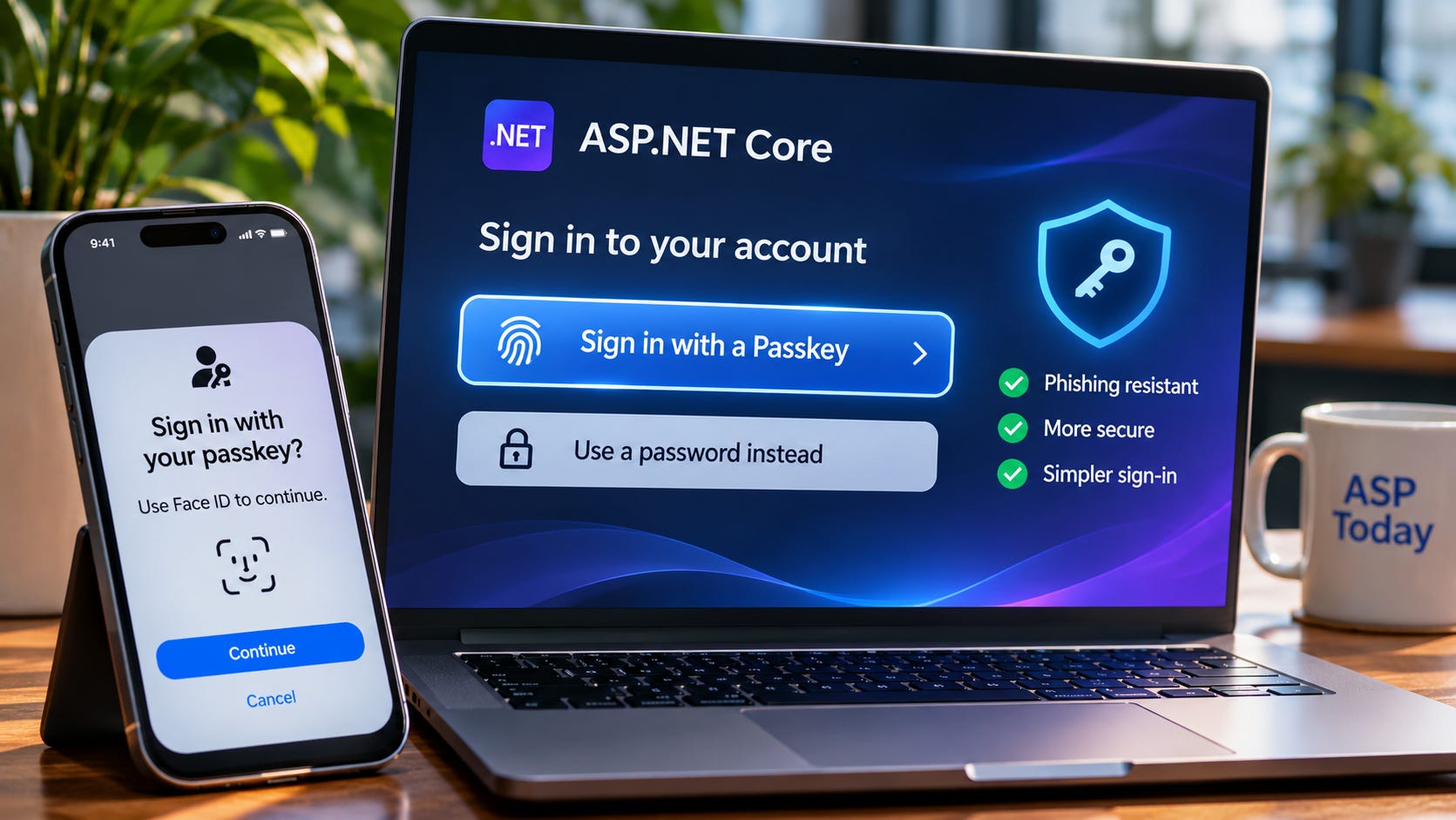
Even well-designed ASP.NET Core applications must manage password resets, account lockouts, credential storage, and the risks associated with stolen passwords.
Passkeys offer a different approach.
Instead of asking users to remember a secret, applications can authenticate them using cryptographic credentials protected by their devices. With WebAuthn and modern ASP.NET Core Identity capabilities, developers can build sign-in experiences that are easier to use and significantly more resistant to phishing. In this guide, we’ll explore how passkeys work, implement registration and authentication workflows, examine the ASP.NET Core integration points, and design secure recovery, device management, and production deployment strategies.
Why Password-Based Authentication Needs to Evolve
Imagine a healthcare appointment platform used by thousands of patients.
A patient wants to check an upcoming appointment.
They open the website, enter their email address, and attempt to sign in.
Unfortunately, they cannot remember their password.
They try several combinations.
After a few failed attempts, they request a password reset.
An email arrives.
They open the link, create a new password, and finally access their account.
The process may take several minutes.
Now imagine the same patient receiving a convincing phishing email that appears to come from the appointment platform.
The email links to a fake login page.
If the patient enters their password, the attacker may capture it and attempt to access the real account.
Multi-factor authentication can reduce this risk, but some traditional authentication methods remain vulnerable to phishing and real-time interception.
Passkeys change the underlying authentication model.
Instead of relying on a reusable password, the patient can sign in using a credential protected by their phone or computer.
The device may ask for a fingerprint, face recognition, PIN, or another local verification method.
The application never needs to receive the user’s biometric data.
And a passkey created for the legitimate website cannot simply be reused on an unrelated phishing domain.
This is the foundation of phishing-resistant authentication.
What Is a Passkey?
A passkey is a credential based on public-key cryptography and commonly used through the WebAuthn standard.
When a user registers a passkey, an authenticator creates a cryptographic key pair.
The pair contains a private key and a public key.
The private key remains protected by the authenticator or credential provider.
The public key is registered with the application.
During sign-in, the application sends a challenge.
The authenticator uses the private key to sign information associated with that challenge.
The server verifies the signature using the stored public key.
The private key is never sent to the server.
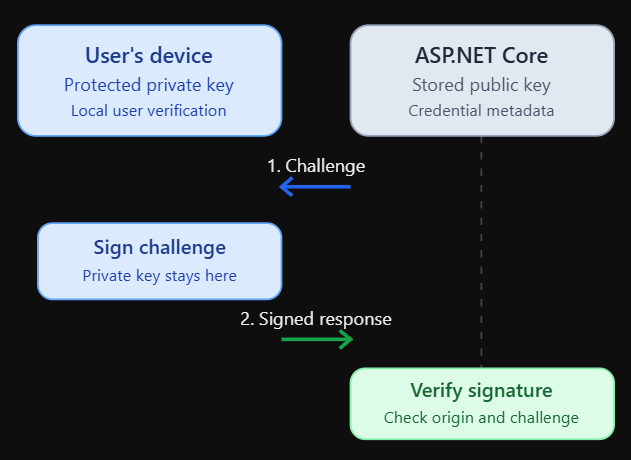
The device proves possession of a private key without revealing it to the application.
This architecture eliminates the need for the server to store a password-equivalent secret for passkey authentication.
It also changes what an attacker can gain from a compromised authentication database.
A stolen public key cannot ordinarily be used to impersonate the user because it cannot generate valid signatures.
However, passkeys don’t eliminate every security risk.
Session theft, compromised application logic, malicious account recovery, and insecure device environments still require protection.
Understanding WebAuthn, FIDO2, and Passkeys
These terms are closely related, but they are not interchangeable.
WebAuthn is the browser-facing web standard that allows applications to create and use public-key credentials.
FIDO2 refers to the broader authentication standards ecosystem, including WebAuthn and the Client to Authenticator Protocol (CTAP).
Passkeys are user-friendly credentials built on this technology, commonly designed to support passwordless authentication.
WebAuthn defines how a web application requests credential creation and authentication.
The browser mediates the interaction.
An authenticator performs the cryptographic operation.
That authenticator might be integrated into a phone, laptop, or security key.
For example, a user may sign in using Windows Hello, a phone’s biometric unlock mechanism, or a compatible hardware security key.
The application doesn’t need to implement the fingerprint reader or facial recognition system.
It asks the browser to perform a WebAuthn operation.
The platform handles the appropriate authenticator interaction.
How Passkeys Resist Phishing
Traditional passwords are reusable secrets.
If a user enters a password on a fake website, an attacker can potentially use that password on the real website.
WebAuthn credentials are bound to a relying party identity.
The browser and authenticator enforce rules about which websites can use a credential.
Suppose the legitimate application is hosted at:
https://appointments.example.comAn attacker creates a phishing website at:
https://appointments-example-login.comThe phishing site cannot simply request a passkey registered for the legitimate relying party.
The domains don’t satisfy the required relying party relationship.
The browser also provides origin information that the server must validate.
This is fundamentally different from a password that a user can type into any website.
But phishing resistance depends on correct implementation.
A server that fails to validate the challenge, origin, relying party ID, or authentication response can undermine the protocol’s protections.
The Difference Between Synced and Device-Bound Passkeys
Not all passkeys have the same portability characteristics.
Some passkeys are synchronized through a credential provider.
A user may create a passkey on one device and later use it on another compatible device through their provider’s synchronization ecosystem.
Other credentials remain bound to a particular authenticator.
Hardware security keys are a common example.
Both approaches use public-key authentication, but their recovery and lifecycle properties differ.
Synced passkeys can improve usability because losing one device doesn’t necessarily mean losing access to the credential.
Device-bound credentials may be preferable for organizations with strict requirements around authenticator possession or hardware-backed credential control.
Applications should not assume that every passkey is synchronized or that every authenticator provides the same security properties.
Those differences matter when designing enterprise authentication policies.
Understanding the WebAuthn Registration Flow
Passkey registration begins when an authenticated user chooses to add a passkey.
The application generates registration options.
Those options include a cryptographically random challenge, relying party information, user information, and supported credential parameters.
The browser receives the options and calls the WebAuthn API.
The authenticator creates a credential.
The browser returns an attestation response.
The server validates the response and stores the credential’s public-key information.
A simplified registration sequence looks like this:
User selects "Add passkey"
          |
          v
ASP.NET Core creates registration options
          |
          v
Browser calls navigator.credentials.create()
          |
          v
Authenticator creates credential
          |
          v
Browser sends credential response
          |
          v
ASP.NET Core validates registration
          |
          v
Public key and credential ID stored
The server must associate the registration challenge with the correct user and registration attempt.
It must also ensure that the challenge cannot be reused indefinitely.
The browser’s response is not trustworthy merely because it came through the WebAuthn API.
The server performs the authoritative validation.
Understanding the Authentication Flow
Sign-in follows a related process.
The user opens the login page.
The application creates authentication options containing a fresh challenge.
The browser calls navigator.credentials.get().
The authenticator locates an appropriate credential and produces a signed assertion.
The browser sends the assertion to the server.
The server verifies it using the stored credential.
If validation succeeds, the application establishes an authenticated session.
User selects "Sign in with passkey"
          |
          v
Server creates authentication challenge
          |
          v
Browser requests credential assertion
          |
          v
Authenticator signs challenge
          |
          v
Server verifies signature and metadata
          |
          v
Application creates authenticated session
The important detail is that the passkey authenticates the user.
The application still needs to create and manage its own session.
For a browser-based ASP.NET Core application, that commonly means issuing a secure authentication cookie.
The passkey doesn’t replace session management, authorization, or application security controls.
Setting Up an ASP.NET Core Application
Let’s build a practical foundation using ASP.NET Core Identity.
For this walkthrough, we’ll use ASP.NET Core Identity on .NET 10, which introduces integrated passkey support.
Earlier ASP.NET Core versions generally require a separate WebAuthn implementation or library.
Create a web application with individual authentication:
dotnet new webapp \
    -au Individual \
    -n PasskeyDemo

cd PasskeyDemo
The template provides an Identity-based authentication foundation.
The exact generated UI and project structure depend on the installed SDK and template version.
Check the target framework:
<TargetFramework>net10.0</TargetFramework>For the examples in this article, use a .NET 10 SDK and compatible ASP.NET Core Identity packages.
The application also needs a database provider and migrations configured for Identity’s credential storage.
The precise setup depends on whether the project uses SQLite, SQL Server, or another supported provider.
Why ASP.NET Core Identity Matters
In our earlier guide on ASP.NET Core Identity and Authentication, we explored how Identity manages user accounts, authentication workflows, and application security. Passkeys extend this foundation by replacing reusable passwords with cryptographic credentials while retaining Identity's account and session management capabilities.
ASP.NET Core Identity manages more than password verification.
It provides infrastructure for users, authentication cookies, account management, security tokens, and related workflows.
With passkey support, Identity can participate in registering and validating passkey credentials.
This avoids building the entire WebAuthn validation pipeline from scratch.
That’s important because WebAuthn verification involves more than checking a cryptographic signature.
The application must validate challenge freshness, origin, relying party identity, authenticator data, credential identifiers, user verification requirements, and other protocol details.
Using a maintained framework implementation reduces the risk of mistakes.
But developers must still configure Identity correctly and design the surrounding account lifecycle.
Understanding the Identity Passkey APIs
In .NET 10, ASP.NET Core Identity provides passkey-related functionality through SignInManager<TUser> and UserManager<TUser>.
The framework supports generating passkey creation and request options, validating passkey responses, and managing stored passkey credentials.
A typical application needs endpoints for four operations.
First, request passkey registration options.
Second, complete registration.
Third, request authentication options.
Fourth, complete authentication.
The registration endpoints should normally require an authenticated user.
Authentication endpoints are accessible before sign-in.
This distinction matters because adding a passkey changes the credentials associated with an account.
It should be treated as a security-sensitive account management operation.
Designing the Passkey API Contract
Let’s define the endpoints before implementing them.
POST /api/passkeys/register/options
POST /api/passkeys/register/complete

POST /api/passkeys/authenticate/options
POST /api/passkeys/authenticate/complete
The first registration endpoint generates WebAuthn creation options.
The browser uses those options to create a credential.
The second endpoint validates and stores the resulting credential.
Authentication follows the same two-step structure.
This separation reflects how WebAuthn works.
The server cannot generate a passkey itself.
The authenticator must participate in credential creation.
Similarly, the server cannot complete sign-in until it receives and validates the authenticator’s signed response.
Generating Registration Options
The registration flow starts on the server.
ASP.NET Core Identity provides a framework-managed mechanism for generating passkey creation options.
Conceptually, the endpoint needs to:
Verify the current user.
Generate passkey creation options.
Bind the challenge to the registration attempt.
Return the options to the browser.
A simplified endpoint structure looks like this:
app.MapPost(
    "/api/passkeys/register/options",
    async (
        HttpContext context,
        UserManager<ApplicationUser> users,
        SignInManager<ApplicationUser> signInManager) =>
    {
        var user = await users.GetUserAsync(
            context.User);

        if (user is null)
        {
            return Results.Unauthorized();
        }

        // Generate passkey creation options using
        // the .NET 10 Identity passkey APIs.
        //
        // Return the framework-generated JSON
        // to the browser.

        return Results.Ok();
    })
    .RequireAuthorization();
This is a structural example, not a complete registration endpoint.
The exact framework API calls should be taken from the Identity version used by the application.
For a production implementation, use the official .NET 10 Identity passkey flow rather than manually constructing registration options without the required validation state.
Calling WebAuthn From the Browser
The browser receives the registration options and calls:
const credential =
    await navigator.credentials.create({
        publicKey: creationOptions
    });
The creationOptions object must use the types expected by WebAuthn.
A common challenge is that JSON transports binary values as strings.
WebAuthn expects fields such as challenge and user.id to contain binary data.
Modern browsers provide helpers for parsing serialized WebAuthn options.
For example:
const options =
    PublicKeyCredential.parseCreationOptionsFromJSON(
        optionsJson);

const credential =
    await navigator.credentials.create({
        publicKey: options
    });
The returned credential must then be serialized and sent to the server.
Modern browsers also provide toJSON() support for public-key credential responses.
const response = await fetch(
    "/api/passkeys/register/complete",
    {
        method: "POST",
        headers: {
            "Content-Type": "application/json"
        },
        body: JSON.stringify(
            credential.toJSON())
    });
Applications should check browser support and provide appropriate fallback behavior.
The server must validate the returned credential using the same registration attempt and challenge.
Completing Registration Securely
Completing registration involves several important checks.
The server must verify that the response corresponds to the challenge it issued.
It must validate the relying party and origin.
It must ensure the credential is acceptable under the application’s authenticator policy.
It must associate the new credential with the authenticated user.
It should also prevent the same credential identifier from being improperly registered across unrelated accounts.
Once registration succeeds, the application stores the credential’s public key and required metadata.
The private key is never stored by the ASP.NET Core application.
The account may now have one or more registered passkeys.
That brings us to another important design consideration.
A user should generally be able to manage multiple authenticators.
Supporting Multiple Passkeys Per Account
A user may have a passkey on their laptop.
They may also have one on a phone.
They may register a hardware security key as a backup.
Supporting multiple credentials improves account resilience.
A user who loses one device may still authenticate with another.
The application should provide an account-management screen showing registered passkeys.
Useful information includes a friendly name, registration date, and other metadata the application can reliably obtain.
For example:
Passkey          Registered            Action
Work laptop      October 12, 2026      Remove
Personal phone   October 18, 2026      Remove
Security key     October 20, 2026      Remove
The application should avoid claiming to know exactly where a synced passkey exists.
A single synchronized credential may be usable across several devices.
Credential management should describe what the application actually knows, not infer the full contents of a user’s credential provider.
Designing the Passkey Sign-In Page
A good passkey experience should feel simpler than entering a password.
The login page might display a prominent button:
Sign in with a passkey
When the user selects it, the application requests authentication options from the server.
The browser then asks the authenticator to complete the sign-in operation.
On supported platforms, the user may confirm with a fingerprint, facial recognition, or device PIN.
The application receives the signed assertion.
The server validates it.
If successful, the user is signed in.
This experience can take only a few seconds.
But usability depends on the browser, operating system, authenticator, and account configuration.
Applications should not assume every user has a passkey-capable device or that every platform presents the same interface.
Implementing the Browser Authentication Call
The browser authentication flow uses navigator.credentials.get().
async function signInWithPasskey() {
    const optionsResponse = await fetch(
        "/api/passkeys/authenticate/options",
        {
            method: "POST"
        });

    if (!optionsResponse.ok) {
        throw new Error(
            "Unable to start passkey sign-in.");
    }

    const optionsJson =
        await optionsResponse.json();

    const options =
        PublicKeyCredential.parseRequestOptionsFromJSON(
            optionsJson);

    const credential =
        await navigator.credentials.get({
            publicKey: options
        });

    if (!credential) {
        throw new Error(
            "Passkey sign-in was cancelled.");
    }

    const result = await fetch(
        "/api/passkeys/authenticate/complete",
        {
            method: "POST",
            headers: {
                "Content-Type": "application/json"
            },
            body: JSON.stringify(
                credential.toJSON())
        });

    if (!result.ok) {
        throw new Error(
            "Passkey authentication failed.");
    }

    window.location.assign("/dashboard");
}
This example assumes the backend returns compatible WebAuthn request options and completes sign-in by issuing the appropriate authentication session.
The client-side code doesn’t verify the signature.
That responsibility belongs to the server.
The browser’s role is to coordinate the WebAuthn ceremony and transmit the result.
What the Server Must Validate During Sign-In
When the server receives a WebAuthn assertion, it cannot simply trust the credential identifier.
It must retrieve the corresponding registered public key.
Then it must validate the cryptographic signature.
It must also verify that the challenge matches the outstanding authentication attempt.
The origin and relying party information must be correct.
The authenticator flags must satisfy the application’s requirements.
Where relevant, credential signature counters and other authenticator metadata must be handled according to the WebAuthn rules.
These checks protect against replay attacks, credential substitution, and incorrect origin acceptance.
This is why using a well-maintained WebAuthn implementation is preferable to manually parsing and verifying authenticator data.
Passwordless Does Not Mean Sessionless
As we discussed in our earlier guide on Security Best Practices in ASP.NET Core, secure authentication is only one part of protecting an application. Even with phishing-resistant passkeys, developers must secure authentication cookies, enforce authorization policies, prevent CSRF attacks, and protect active user sessions.
After successful passkey authentication, the application still needs a session.
For a server-rendered ASP.NET Core application, an authentication cookie is a common choice.
The cookie should be protected using appropriate settings.
builder.Services.ConfigureApplicationCookie(
    options =>
    {
        options.Cookie.HttpOnly = true;
        options.Cookie.SecurePolicy =
            CookieSecurePolicy.Always;

        options.Cookie.SameSite =
            SameSiteMode.Lax;

        options.ExpireTimeSpan =
            TimeSpan.FromHours(8);
    });
This example illustrates cookie configuration, not a complete authentication setup.
The application should also enforce authorization policies, handle logout, manage session expiration, and protect state-changing requests against cross-site request forgery.
A phishing-resistant login does not prevent an attacker from abusing an already stolen session cookie.
Authentication and session security must work together.
Passkeys and Backend-for-Frontend Architecture
In our previous article on Building Backend-for-Frontend APIs with ASP.NET Core, we explored how client-specific API layers simplify authentication, protect backend credentials, and establish clear security boundaries. Passkeys complement this architecture by enabling phishing-resistant browser authentication while the BFF manages secure sessions and backend communication.
Passkeys fit naturally into that architecture.
A browser-based BFF can perform the WebAuthn sign-in flow and establish a server-managed session.
The browser communicates with the BFF using a secure cookie.
The BFF communicates with backend services using appropriate service credentials or delegated user tokens.
Browser
   |
   | WebAuthn sign-in
   v
ASP.NET Core BFF
   |
   | Secure session
   |
   | Backend authorization
   v
Application services
This design separates browser authentication from internal service communication.
The BFF doesn’t need to expose backend access tokens to browser JavaScript.
However, backend services must still enforce their own authorization requirements.
A successful passkey login proves the user’s identity. It does not automatically grant permission to every resource in the system.
Passkeys and Multi-Factor Authentication
Passkeys are sometimes described as replacing multi-factor authentication.
The relationship is more nuanced.
A passkey can provide multi-factor authentication properties when it combines possession of a cryptographic credential with local user verification.
For example, the authenticator may require a device PIN or biometric verification before signing the challenge.
The server can require and verify the appropriate WebAuthn user-verification result.
But not every WebAuthn credential or authentication ceremony provides identical assurance.
A system with strict security requirements should define which authenticator properties and verification results it accepts.
It should also distinguish ordinary user authentication from higher-assurance actions.
For example, changing a bank account number may require fresh authentication even if the user already has an active session.
Step-Up Authentication for Sensitive Operations
Consider an administrative application.
A user signs in with a passkey and opens the dashboard.
Later, they attempt to change another user’s permissions.
That operation may require stronger assurance than simply viewing the dashboard.
The application can require recent authentication before allowing the change.
This is known as step-up authentication.
The system may ask the user to complete another WebAuthn authentication ceremony.
The server then records that the user recently satisfied the required authentication condition.
The important point is that the backend must enforce the step-up requirement.
Displaying a passkey prompt in the frontend is not enough.
Sensitive operations must verify the resulting authentication state and its freshness.
Account Recovery Is the Hardest Part
Passkeys simplify everyday sign-in, but account recovery remains challenging.
What happens when a user loses their phone?
What if their laptop is damaged?
What if they no longer have access to their credential synchronization provider?
A secure application needs a recovery strategy.
Possible approaches include additional registered passkeys, recovery codes, verified recovery workflows, or administrative recovery for managed enterprise accounts.
Each method has tradeoffs.
A weak recovery process can undermine strong passkey authentication.
For example, if an attacker can bypass passkey sign-in simply by convincing support staff to reset the account, the account remains vulnerable.
Recovery must be treated as a security-sensitive workflow.
Avoiding Recovery Downgrade Attacks
Imagine an application that requires phishing-resistant passkeys.
But it also allows users to recover their accounts using only an email link.
If an attacker compromises the user’s email account, they may be able to bypass the passkey requirement.
This is a recovery downgrade.
The application should evaluate whether its recovery methods provide assurance appropriate to the protected account.
For ordinary consumer applications, email-based recovery may be an acceptable usability tradeoff.
For high-security administrative systems, stronger recovery controls may be required.
The correct approach depends on the application’s threat model.
There is no universal recovery method that is both frictionless and appropriate for every security level.
Removing and Replacing Passkeys
Users should be able to remove credentials they no longer trust.
Suppose an employee loses a laptop.
They sign in using another registered passkey.
They open account settings and remove the lost device’s credential.
The server deletes or disables the corresponding credential record.
Future assertions using that credential should no longer be accepted.
For sensitive account changes, require recent authentication.
Also consider notifying the user when a passkey is added or removed.
Such notifications can help detect unauthorized account-management activity.
But a notification is not a substitute for authorization.
The application must enforce the credential-management rules on the server.
Credential Storage and Database Design
Passkey authentication requires the server to store public-key credential information.
At minimum, the application needs to associate a credential identifier and public key with the correct user.
It may also store credential metadata needed for verification and management.
A conceptual schema might look like this:
CREATE TABLE UserPasskeys
(
    Id BIGINT PRIMARY KEY,
    UserId NVARCHAR(450) NOT NULL,
    CredentialId VARBINARY(1024) NOT NULL,
    PublicKey VARBINARY(MAX) NOT NULL,
    FriendlyName NVARCHAR(200) NULL,
    CreatedAt DATETIME2 NOT NULL,
    LastUsedAt DATETIME2 NULL
);
This example uses SQL Server syntax.
It is illustrative, not a replacement for the schema required by ASP.NET Core Identity.
Production implementations should use the framework’s supported credential storage model and migrations.
The actual WebAuthn credential record may need additional fields, including information about the authenticator and signature counter.
Do not assume the simplified table contains everything necessary for secure verification.
Passkey Registration Must Be Protected
Adding a passkey is equivalent to adding a new way to access an account.
An attacker who can register their own passkey on someone else’s account may gain persistent access.
For that reason, passkey registration should normally require an authenticated session.
High-risk applications may also require recent authentication before adding a credential.
The registration challenge must be bound to the correct account.
The server must verify that the registration attempt is still valid.
CSRF protections matter when cookie-authenticated browser endpoints modify account credentials.
The application should also limit registration attempts and log credential-management events.
These safeguards are essential even though the underlying passkey cryptography is strong.
Browser Compatibility and Feature Detection
WebAuthn is supported by modern browsers, but individual features and user experiences vary.
An application can check whether the browser exposes the necessary APIs.
if (!window.PublicKeyCredential) {
    console.log(
        "WebAuthn is not available.");
}
More advanced applications can check support for particular capabilities, such as platform authenticators or conditional mediation.
However, feature detection should guide the user experience rather than become an overly restrictive gate.
A device without an integrated biometric sensor may still support passkeys through a hardware security key or another compatible authenticator.
The application should avoid assuming that biometric hardware is mandatory.
Passkeys are based on cryptographic credentials, not a particular biometric technology.
Conditional UI and Autofill
Modern passkey experiences can integrate with browser autofill.
Instead of forcing users to click a separate button, an application can offer passkeys as part of the sign-in field experience.
This is commonly called conditional UI or conditional mediation.
The browser can display available passkeys alongside other supported sign-in options.
A simplified WebAuthn call may use:
const credential =
    await navigator.credentials.get({
        publicKey: requestOptions,
        mediation: "conditional"
    });
Conditional mediation has specific browser and page requirements.
Applications must check support and ensure the sign-in form is configured appropriately.
A traditional passkey button remains a useful fallback.
The goal is to make secure authentication discoverable without forcing users through confusing device-specific instructions.
Passkeys Across Multiple Domains
WebAuthn credentials are associated with a relying party ID.
This creates important constraints for applications using multiple domains or subdomains.
Suppose a company operates:
app.example.com
admin.example.com
accounts.example.com
Depending on the chosen relying party configuration and origin validation policy, related subdomains may be able to participate in a shared passkey strategy.
But an unrelated domain cannot simply use the same credential.
Developers must plan relying party IDs before deployment.
Changing the authentication domain later may affect existing credentials.
This is especially important for SaaS applications that support custom customer domains.
Passkey authentication should be designed around stable, controlled authentication origins.
Multi-Tenant SaaS Considerations
A multi-tenant ASP.NET Core application may serve hundreds of organizations.
Each organization may have its own users, security policies, and authentication requirements.
The application must ensure that a passkey credential is associated with the correct account and tenant context.
Authentication identifies a user.
Authorization determines which tenant resources that user can access.
Those are separate decisions.
A valid WebAuthn assertion must not automatically grant access to every tenant.
The application should enforce tenant membership and permissions after authentication.
Enterprise customers may also require federated sign-in through their identity provider rather than direct passkey registration inside the application.
In that case, passkey authentication may occur at the identity provider, while ASP.NET Core validates the resulting OpenID Connect session.
Passkeys With External Identity Providers
Not every ASP.NET Core application needs to implement WebAuthn registration and verification itself.
Many applications delegate authentication to an external identity provider.
For example, an organization may use Microsoft Entra ID or another OpenID Connect provider.
The identity provider can manage passkeys and authenticator policies.
The ASP.NET Core application receives an authenticated identity through the configured federation flow.
This approach can simplify application development and centralize identity governance.
It is especially useful when organizations need centralized account lifecycle management, conditional access, and enterprise authentication policies.
Direct passkey integration makes sense when the application itself owns consumer identities and needs control over the registration and sign-in experience.
The choice depends on who owns the identity system.
Rate Limiting and Abuse Prevention
Passkey authentication eliminates password guessing as a direct attack against a reusable secret.
But authentication endpoints can still be abused.
Attackers may repeatedly request challenges, trigger expensive verification work, or attempt account enumeration.
Apply rate limits to authentication and registration endpoints.
Monitor unusual failure patterns.
Avoid revealing unnecessary account-existence information.
Expire challenges promptly.
Bind challenges to the intended ceremony.
Use cryptographically secure randomness.
Also consider the effect of automated traffic on credential registration and account recovery endpoints.
A strong authentication protocol still needs operational defenses.
Observability for Passkey Authentication
Authentication failures can be difficult to diagnose.
A user may cancel the browser prompt.
The authenticator may not contain a matching credential.
The challenge may have expired.
The origin may be incorrect.
The server may reject the assertion.
The application should distinguish these conditions in internal telemetry while returning safe, understandable messages to users.
Useful metrics include registration success rate, sign-in success rate, challenge expiration frequency, verification failures, and account recovery usage.
However, authentication logs must not expose secrets or sensitive credential material.
Credential identifiers and account information should be handled according to the application’s privacy and security requirements.
The purpose of observability is to improve reliability and detect abuse, not to collect unnecessary authentication data.
Testing Passkey Authentication
Passkey authentication requires more than ordinary endpoint tests.
Start by testing successful registration.
Verify that a new credential is associated with the correct user.
Then test successful authentication.
Confirm that the server establishes the expected session and authorization context.
Next, test failure scenarios.
A challenge should not be accepted twice.
A response for the wrong origin should fail.
A credential registered for one account must not authenticate another account improperly.
Expired challenges should be rejected.
Removed credentials must no longer work.
Credential-management endpoints must enforce authentication and authorization.
Browser-level tests should cover actual WebAuthn interactions using supported test authenticators or browser automation facilities.
Manual testing across operating systems and credential providers is also valuable because user experiences vary.
Testing Without Real Biometric Hardware
Developers don’t need a fingerprint reader for every automated test.
Browser automation tools and development environments can provide virtual authenticators.
These can simulate credential creation, authentication, user verification, and certain failure scenarios.
Virtual authenticators are useful for repeatable integration tests.
But they don’t fully replace testing on real devices.
Cross-device authentication, synced credentials, platform prompts, and account recovery can behave differently in real environments.
A complete test strategy combines automated protocol tests with targeted device and browser testing.
Performance Considerations
Passkey authentication involves cryptographic operations and database lookups.
For most applications, these costs are manageable.
However, high-traffic authentication systems should still measure latency and throughput.
The server may need to retrieve credential records, validate assertions, update metadata, and issue sessions.
Database indexes on credential identifiers are important.
Challenge storage must scale appropriately across application instances.
If an authentication attempt begins on one server and completes on another, the second server must be able to validate the original challenge.
In-memory challenge state tied to a single server instance can cause failures in load-balanced deployments.
Shared, appropriately protected challenge state is generally necessary for distributed authentication systems.
Deploying Passkeys Across Multiple ASP.NET Core Instances
Production applications often run behind a load balancer.
A user begins passkey registration on Server A.
The browser performs the WebAuthn operation.
The completion request reaches Server B.
Server B must have access to the challenge and registration state created by Server A.
This requires a shared or otherwise consistent state mechanism.
The application’s authentication cookies must also work across instances.
For cookie-based ASP.NET Core applications, shared Data Protection key management is important.
Without consistent cryptographic key material, one server may be unable to validate cookies issued by another.
These are ordinary distributed application concerns, but they become especially visible during authentication workflows.
HTTPS Is Essential
WebAuthn requires a secure context, with limited development exceptions such as localhost.
Production applications should use HTTPS.
The browser relies on origin information as part of the WebAuthn security model.
Incorrect reverse proxy configuration can cause the application to misunderstand its external scheme or host.
That may lead to invalid origin expectations and failed authentication.
Configure forwarded headers carefully when ASP.NET Core runs behind trusted proxies.
Use a stable public authentication domain.
Avoid relying on internal container hostnames or private service addresses when defining WebAuthn origins.
Authentication infrastructure must reflect the public origin the browser actually uses.
Migrating Existing Users to Passkeys
Most established applications already have users with passwords.
Requiring every user to switch immediately may create unnecessary friction.
A gradual migration is often more practical.
First, allow existing users to register a passkey after signing in.
Next, make passkey sign-in prominent for users who have registered one.
Then encourage users to add backup credentials.
Over time, the application can evaluate whether passwordless-only authentication is appropriate.
The migration plan should account for users who cannot use passkeys, have older devices, or depend on accessibility technologies.
Removing passwords should be a deliberate product and security decision.
A successful migration depends on both technical correctness and user understanding.
Common Mistakes to Avoid
One common mistake is treating passkeys as biometric authentication.
Biometrics may unlock the credential locally, but the server authenticates a cryptographic assertion.
Another mistake is assuming passkeys eliminate all account security problems.
They reduce important risks, especially phishing and password theft, but session management and recovery remain critical.
Developers should also avoid implementing WebAuthn verification manually without a strong reason.
Incorrect challenge, origin, or relying party validation can undermine the protocol.
A weak recovery workflow can bypass strong authentication.
A poorly designed multi-domain configuration can create credential compatibility problems.
And a system that allows users to register new passkeys without appropriate account verification can expose accounts to persistent compromise.
The protocol is powerful, but the surrounding application must be designed carefully.
A Production-Ready Authentication Architecture
Let’s bring the pieces together.
Our healthcare appointment platform uses ASP.NET Core Identity.
Users register passkeys through a secure account-management flow.
The browser uses WebAuthn to create credentials.
Identity validates the registration and stores public-key credential information.
During sign-in, the server generates a fresh challenge.
The browser requests an authenticator assertion.
Identity validates the response.
The application issues a secure session cookie.
Authorization policies control access to appointments, medical records, and administrative functions.
Users can register multiple passkeys and remove credentials they no longer trust.
Recovery follows a documented security policy.
Authentication telemetry detects unusual failures without exposing sensitive data.
The application runs over HTTPS with consistent challenge state and cookie protection across server instances.
This is the foundation of a maintainable passwordless authentication system.
Coming Next
In our next article, we’ll explore Software Supply Chain Security for ASP.NET Core: NuGet, SBOMs, Signing, and Dependency Risk.
Modern .NET applications depend on far more than the code developers write themselves.
They rely on NuGet packages, build tools, container images, CI/CD pipelines, and third-party dependencies.
A vulnerability or compromised dependency can introduce risk even when the application’s own code is secure.
We’ll explore how to evaluate package risk, detect vulnerable dependencies, generate software bills of materials, protect build pipelines, and improve the integrity of ASP.NET Core releases.
Closing Thoughts
Passkeys represent an important shift in how applications authenticate users.
Instead of relying on reusable passwords, they use public-key cryptography and authenticators protected by the user’s device or credential provider.
The server stores a public key.
The authenticator protects the private key.
Each authentication ceremony uses a fresh challenge.
The browser and server enforce origin and relying party rules.
Together, these properties make properly implemented passkey authentication significantly more resistant to phishing than traditional password-based sign-in.
ASP.NET Core Identity provides a foundation for integrating passkeys into modern .NET applications.
But successful passwordless authentication requires more than a registration button and a login prompt.
Applications must manage credential lifecycles, protect registration, design secure recovery, enforce authorization, handle distributed deployment, and support users across different devices.
The goal of passwordless authentication isn’t simply to remove a password field. It’s to replace reusable secrets with a stronger authentication model while making secure sign-in easier for the people using the application.
Subscribe Now
Building secure ASP.NET Core applications means understanding the technologies behind authentication, authorization, identity management, and modern web security.
Subscribe to ASP Today for practical .NET tutorials, real-world security guidance, and production-focused architecture articles.
Join our Substack Chat to discuss passkeys, WebAuthn, ASP.NET Core Identity, authentication design, and the challenges of building secure applications.
Subscribe now and follow the series as we continue exploring the tools and techniques behind modern ASP.NET Core development.